Finding the best wireless speaker for computer usage involves balancing sound quality, ease of connectivity, and design. This article reviews top wireless speakers that excel in these areas, featuring Bluetooth connectivity, enhanced bass, and user-friendly controls. Below is a summary table listing the key models covered to help you quickly compare their main features and compatibility.
| Speaker Model | Brand | Connectivity | Key Features |
|---|---|---|---|
| Logitech Z207 2.0 Stereo Computer Speakers | Logitech | Bluetooth & 3.5mm | Easy-Switch, Passive Radiator Bass |
| [Upgraded] USB Computer/Laptop Speaker | LIELONGREN | USB | Dual Drivers, No AUX Needed |
| LXTNFU Monitor Clip-on Computer Speakers | LXTNFU | USB-C | Loud Sound, Monitor Clip |
| Logitech Z407 Bluetooth Speakers with Subwoofer | Logitech | Bluetooth & Multiple Inputs | Wireless Control, Subwoofer |
| KEiiD Bluetooth Computer Speakers with Touch Pod | KEiiD | Bluetooth | Touch Control Pod, 4 EQ Modes |
Logitech Z207 2.0 Stereo Computer Speakers with Bluetooth

The Logitech Z207 offers versatile connectivity options including Bluetooth wireless and a 3.5mm cable, allowing seamless connection to a range of devices. Its Easy-Switch technology allows users to effortlessly switch between audio sources by pausing and playing audio on different devices. Each speaker features an active driver and a passive radiator, delivering full-range audio with enhanced bass extension, providing a balanced and powerful sound for computer use.
[Upgraded] USB Computer/Laptop Speaker with Stereo Sound & Enhanced Bass
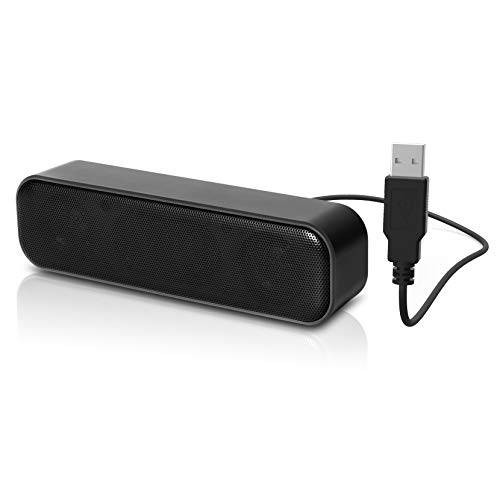
This compact speaker from LIELONGREN is powered and connected through a single USB cable, eliminating the need for 3.5mm AUX jacks and reducing cable clutter. Equipped with dual 3W high-excursion drivers and a passive radiator, it delivers loud, distortion-free sound with a rich bass response. Compatible with various Windows PCs and laptops, it provides a plug-and-play experience but requires volume adjustments via the computer itself due to the lack of physical controls.
LXTNFU Computer Speakers with Monitor Clip and USB-C

The LXTNFU monitor speakers feature two 1.4-inch internal magnetic drivers that ensure clear and loud sound for desktop setups. These USB-powered speakers support plug and play with most computers, eliminating the need for AUX cables. A standout feature is the spring-loaded clip which allows easy attachment to monitor edges or placement on the desk, optimizing workspace. Note that these speakers are not compatible with TV or gaming consoles that require 3.5mm audio input.
Logitech Z407 Bluetooth Computer Speakers with Subwoofer
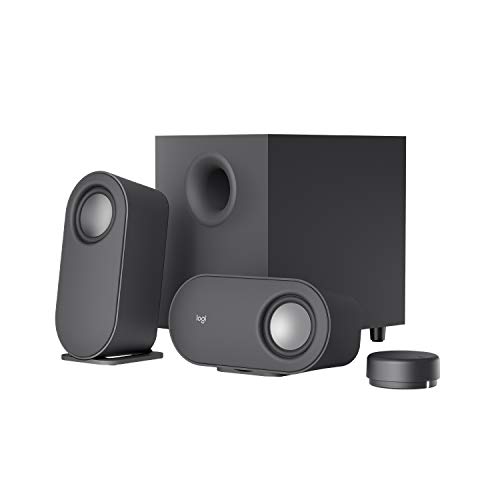
The Logitech Z407 system delivers immersive sound with 80W peak power and a down-firing subwoofer for deep, rich bass. Bluetooth connectivity along with multiple wired input options provide flexibility for various devices. Users enjoy wireless control over volume, bass, and playback with a dial that works up to 30 meters away. Its robust bass and clarity make it suitable for music, movies, and gaming on computers.
KEiiD Bluetooth Computer Speakers with Wireless Touch Control Pod

The KEiiD KD-C02 Bluetooth speakers combine elegant design with advanced audio technology. Featuring silk dome tweeters for crisp sound and a 12W bass woofer for deep lows, they provide well-rounded audio performance. The set also includes an innovative wireless touch control pod, resembling a mouse, which offers remote control of sound and EQ modes from anywhere in the room. This blend of style and functionality suits both work and entertainment purposes.
Buying Guide for Wireless Computer Speakers
When choosing the best wireless speaker for your computer, consider the following important factors to ensure optimal performance and satisfaction.
1. Connectivity Options
Bluetooth wireless speakers offer convenience and reduce cable clutter, but some models also provide 3.5mm or USB connections for compatibility with various devices. Determine which input methods your computer supports and prefer wireless flexibility for ease of use.
2. Sound Quality and Drivers
Look for speakers with dedicated tweeters and passive radiators or subwoofers to handle a full audio spectrum. Dual drivers or enhanced bass technology improve sound richness, especially for music, gaming, or movies.
3. Power and Volume
Speakers powered by USB can simplify setup versus those needing external power. Consider loudness capabilities, especially if you work in noisy environments or want richer audio within larger spaces.
4. Control Features
Wireless remote control, physical dials, or even touch control pods enhance usability by allowing volume and playback adjustments without directly interacting with the speakers or computer.
5. Design and Space Utilization
Compact, clip-on, or desktop-standing designs impact your workspace setup. Speakers that can attach to monitors or integrate into your desk area efficiently save space while providing clear audio.
6. Compatibility
Ensure compatibility with your operating system and hardware. Some USB-powered speakers may only work with Windows, so verify support for macOS or other platforms if needed.
Reviewing these aspects will help you find wireless computer speakers that fit your audio expectations, convenience needs, and workspace aesthetics.