Choosing the right WiFi digital signage player involves balancing ease of use, content management, and reliability. This guide reviews top options from well-known brands, highlighting features like cloud control, CMS compatibility, 4K support, and remote management. Each product section below includes an at-a-glance look at what you get and how it can fit various business needs. A summary table at the start helps you compare core specs quickly.
| Product | Brand | Key Features |
|---|---|---|
| OptiSigns OptiStick Digital Signage Player | OptiSigns | Android-based, 4K, WiFi/Ethernet, remote management, 160+ apps |
| Amazon Signage Stick | Amazon | CMS compatibility, kiosk mode, easy setup with mobile app |
| EZ AD TV Digital Signage Player | EZ-AD | 4K content, cloud control, template library, mobile app |
| LIGHTNING ADS Digital Signage Player | LIGHTNING ADS | Plug & Play, free upload, menu scheduler, remote management |
| Geniatech Android 11 Smart TV Box | Geniatech | 4K HEVC, dual-band WiFi, RS232, robust hardware |
OptiSigns OptiStick: A Versatile Android 4K Signage Stick

The OptiSigns OptiStick is an Android-based 4K signage player designed for easy deployment across retail, hospitality, or corporate environments. Its quad-core performance supports high-resolution content with smooth playback, while both WiFi and Ethernet options offer flexible network connectivity. Pre-installed OptiSigns Player ensures quick setup, and centralized control is possible via the OptiSigns portal or Admin app. The device emphasizes integration, boasting access to 160+ apps to enhance content possibilities, from weather widgets to social feeds. This combination of local processing power and cloud-driven management makes it suitable for mid-sized deployments that require reliable, scalable signage without complex IT overhead.
Key considerations include ensuring your network can support remote management traffic and confirming compatibility with your CMS. The OptiStick’s broad app ecosystem helps tailor content to different audiences, but owners should plan for ongoing content scheduling and potential subscription needs for advanced features. Overall, it presents a strong value in a compact form factor for networks needing flexible content delivery and robust app integrations.
Amazon Signage Stick: Professional 4K Signage Solution

The Amazon Signage Stick is pitched as a professional digital signage device with kiosk-mode capability to enable unattended operation. Designed for businesses of all sizes, it emphasizes quick setup via the free Amazon Signage app, allowing you to deploy one or multiple devices with minimal IT effort. A key strength is seamless CMS integration, supporting common providers to ensure your existing content workflow remains intact. While it streamlines deployment, potential buyers should verify CMS compatibility with their preferred software subscriptions and consider whether kiosk-mode features align with their display and security requirements.
EZ AD TV Digital Signage Player

EZ-AD’s 4K digital signage player focuses on content creation and control, featuring a sizeable media library with hundreds of thousands of options. A free plan provides core capabilities, including content formats and basic support, with premium plans offering expanded features. The device supports cloud-based content management and a mobile app, allowing on-the-go updates. Its Template Builder and YouTube Loader streamline content production, reducing time-to-publish. For businesses weighing cost against capability, EZ-AD provides a scalable path from entry-level to more feature-rich setups without large upfront investments.
LIGHTNING ADS Digital Signage Player
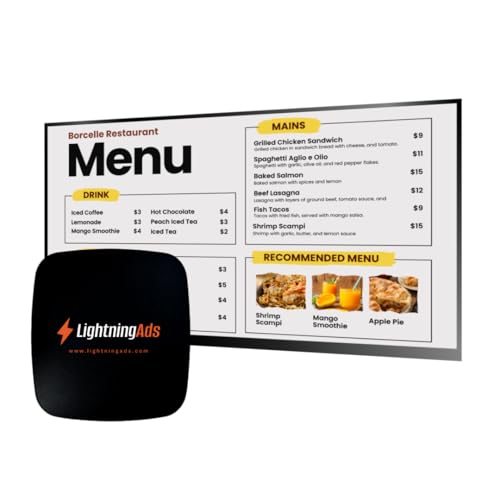
Lightning Ads emphasizes simplicity with a plug-and-play setup that gets displays online quickly. Attach the HDMI and power, connect to Wi-Fi, and content management becomes possible from anywhere. The product includes free upload capabilities and a menu scheduler, enabling basic content changes without ongoing fees. Access to premium tools like a Template Builder and AI Enhancer is available via affordable upgrades, making it an appealing option for small businesses or venues that want to start simple but scale with advanced features over time. Remote management supports multi-screen deployments without heavy IT involvement.
Geniatech Android 11 Smart TV Box 4K

Geniatech’s Android 11 Smart TV Box targets industrial and commercial advertising with robust hardware, including 2GB RAM and 8GB ROM, and 4K HEVC playback over HDMI. Dual-band WiFi and Ethernet support reliable network connectivity, while RS232 compatibility facilitates integration with industrial equipment. An Amlogic S905X4 quad-core processor provides capable decoding performance for complex signage needs. The device’s metal bottom shell aids heat dissipation, contributing to long-term reliability in busy installations. This option is suited for environments requiring durable hardware and flexible connectivity to legacy systems.
Buying Guide: Key Purchase Considerations
- Connectivity and reliability: Consider whether you need Ethernet, dual-band WiFi, or optional cellular. For larger deployments, network stability is crucial to prevent content gaps.
- Processing power and 4K support: Ensure the device’s CPU/GPU and memory meet your content format needs, especially for high-resolution video and interactive content.
- Cloud management and CMS compatibility: If you rely on a specific CMS, verify compatibility and whether cloud control supports remote scheduling, batch deployments, and device monitoring.
- Content capabilities: Look for built-in templates, media libraries, or app ecosystems that align with your marketing goals. Some devices offer AI tools or template builders to accelerate content creation.
- Remote management and scalability: For multiple displays, prioritize solutions with centralized dashboards, role-based access, and secure OTA updates to minimize on-site maintenance.
- Security and updates: Consider devices with regular firmware updates, secure boot, and app permission controls to protect against vulnerabilities across public spaces.
- Price versus feature set: Weigh upfront hardware costs against subscription plans, CMS licenses, and premium features. A lower initial cost may lead to higher long-term expenses if licenses are required for essential capabilities.
- Hardware durability: For kiosks or high-traffic areas, factor in heat dissipation, rugged enclosures, and long-term warranty coverage.
- Ease of use: Content management should be intuitive for staff. A well-supported mobile app and straightforward content scheduling can reduce the need for specialized IT staff.
- Future-proofing: Consider a platform with ongoing app support and compatibility with next-generation displays to minimize the need for rapid hardware refreshes.