Choosing the right wifi audio or wireless speaker affects sound, smart features, and multiroom flexibility. The table below summarizes five noteworthy options including smart speakers, network amplifiers, and Wi‑Fi audio adapters to convert existing speakers for wireless streaming.
| Product | Type | Key Strength |
|---|---|---|
| Google Audio (2-Pack) Smart Speakers | Smart Wi‑Fi Speaker Bundle | Stereo Pairing & Google Assistant |
| Google Audio Bluetooth Speaker (Charcoal) | Single Smart Wi‑Fi Speaker | Built‑in Assistant, Chromecast |
| Sony SRS‑RA3000 | Wi‑Fi/Bluetooth Smart Speaker | 360 Reality Audio & Room Calibration |
| Arylic Up2stream A50+ Stereo Amplifier | Wi‑Fi Stereo Amplifier | Convert Passive Speakers To Wi‑Fi/Multiroom |
| ACEMAX Audiocast Pro M20 | Wi‑Fi Audio Receiver / Multiroom Adapter | App Control & Multiple Streaming Options |
Google Audio (2-Pack) Smart Speakers – Wireless Bluetooth & Wi‑Fi Home Speaker Bundle

This 2‑pack from Google is designed for stereo pairing and multiroom use via Wi‑Fi. The set supports grouping multiple Google Audio devices to play synchronized audio across rooms. Built‑in Google Assistant enables voice control for playback, volume, and smart home commands without a phone.
Key features referenced include left/right channel separation for enhanced stereo imaging, clear vocals and bass performance for typical living spaces, and voice‑activated transfer of audio between rooms. This bundle suits users looking for a simple ecosystem experience and native integration with Chromecast‑enabled services.
Google Audio Bluetooth Speaker – Wireless Music Streaming (Charcoal)

The Google Audio single‑speaker model provides dual‑band Wi‑Fi 5 and Bluetooth connectivity, built‑in Chromecast, and Google Assistant support. It features a specified 3″ woofer and 0.7″ tweeter intended to deliver balanced bass and clear treble for room‑filling playback.
Use cases emphasized by the listed features include wireless streaming from popular services, hands‑free smart home control, and stereo pairing with another unit for expanded coverage. The unit is suitable for users who want a compact smart speaker with both Wi‑Fi streaming and Bluetooth convenience.
Sony SRS‑RA3000 360 Reality Audio Wi‑Fi / Bluetooth Wireless Speaker

Sony’s SRS‑RA3000 emphasizes immersive 360 Reality Audio and ambient room‑filling sound. The speaker includes sound calibration that adapts output to the room and uses Sony’s processing to expand stereo material into a broader soundstage.
Listed features include weather resistance, room calibration, and compatibility with Alexa and Google Assistant. Power consumption and integration with streaming services are noted. This model targets listeners prioritizing spatial audio reproduction and automatic adaptation to room acoustics.
AirPlay 50W x 2 Stereo Amplifier – Arylic Up2stream A50+
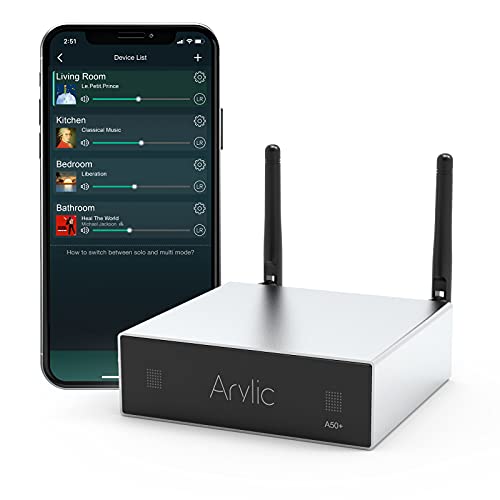
The Arylic Up2stream A50+ is a stereo amplifier designed to add wifi streaming and AirPlay capabilities to passive speakers. It supports multiroom and multizone playback across devices on the same network and streams over Wi‑Fi without compression when configured.
Control is via the 4STREAM app or a web browser, including EQ presets, multiroom grouping, and firmware updates. This product converts existing speaker systems into networked streaming endpoints and is relevant for users who want higher power output and the flexibility to keep legacy speakers.
ACEMAX Audiocast Pro M20 Wireless WiFi Audio Receiver Multiroom Adaptor

The ACEMAX Audiocast PRO M20 is a compact Wi‑Fi audio receiver that converts powered or passive speaker systems into network streaming devices. It supports multiroom grouping via an iOS/Android app and streams lossless audio over Wi‑Fi when the source and network permit.
Listed features include support for popular streaming services such as Spotify, Tidal, TuneIn, and iHeartRadio, with the ability to control rooms individually or combined. The product notes limitations in service compatibility—explicitly not supporting certain platforms—and highlights Ethernet and Bluetooth connectivity options for added flexibility.
Buying Guide – How To Choose A Wifi Audio Wireless Speaker
Selecting the right wifi audio or wireless speaker depends on your listening needs, existing equipment, and desired ecosystem. Below are key considerations to guide your choice.
Connectivity And Streaming Protocols
- Wi‑Fi vs Bluetooth: Wi‑Fi typically provides higher fidelity, multiroom capability, and direct access to streaming services. Bluetooth is useful for quick pairing but lacks synchronized multiroom play and may compress audio.
- Protocols: Check support for AirPlay, Chromecast, Spotify Connect, or proprietary multiroom systems. Compatibility determines ease of use across devices and services.
Sound Performance And Speaker Type
- Smart Speakers: Integrated voice assistants and convenience features but limited amplification for large rooms.
- Network Amplifiers / Upgrades: Devices like the Arylic A50+ add power to passive speakers and maintain higher audio fidelity for dedicated stereo setups.
- Receivers / Adapters: Products such as Wi‑Fi audio receivers convert existing systems for multiroom streaming without replacing speakers.
Multiroom And Stereo Pairing
- Multiroom Sync: If you want whole‑home synchronized playback, ensure the device supports grouping across rooms.
- Stereo Pairing: For a wider soundstage, verify whether two units can be used as left/right channels.
Smart Features And Ecosystem
- Voice Assistants: Built‑in assistants provide hands‑free control and smart home integration; confirm which assistant is supported.
- App Control: Robust app control enables EQ, firmware updates, and multiroom management—useful for fine‑tuning and reliability.
Compatibility With Existing Gear
- Inputs/Outputs: Check analog, digital, and Ethernet connectivity to integrate into current AV equipment.
- Amplification Needs: If you own passive speakers, an amplifier or network amp is required; otherwise choose an active/smart speaker.
Streaming Service Support
- Verify Supported Services: Confirm that your preferred streaming services are supported directly or via Chromecast/AirPlay. Some receivers may not support every service.
Room Size And Acoustic Considerations
- Power And Drivers: Larger rooms typically require larger drivers or powered amplification for consistent coverage.
- Sound Calibration: Features like room calibration can improve bass and imaging in treated or untreated rooms.
Network And Performance
- Dual‑Band Wi‑Fi: Dual‑band support reduces dropouts and handles multiroom traffic better than single‑band devices.
- Ethernet Option: Wired connections improve stability for high‑quality streaming and multizone setups.
Future Expandability
- Scalability: Consider whether you can add more speakers or amps to expand coverage over time without replacing the core system.