Preserving old memories stored on VHS tapes is easier than ever with modern VHS to DVD converters and recorders. This guide highlights top options that convert analog video to digital formats, transfer tapes to DVDs, and offer easy playback. Each pick is evaluated for ease of use, compatibility, and output quality to help you choose the right device for your collection.
| Product | Brand | Key Benefit |
|---|---|---|
| Portta VHS To Digital Converter | Portta | 1080P capture with USB/SD storage |
| LG VHS To DVD Recorder VCR Combo | LG | One-button transfer to DVD |
| Panasonic VHS To DVD Recorder VCR Combo | Panasonic | Home transfer with HDMI output |
| ClearClick Video To Digital Converter 2.0 | ClearClick | Direct USB recording from multiple sources |
| Portta VD22P VHS To Digital Converter | Portta | 5″ HD screen for live preview |
Portta VHS To Digital Converter

Portta’s converter/recorder offers a straightforward path to digital copies without a PC. It supports AV/RCA (CVBS+R/L), S-Video, and AUX inputs, and records at up to 1080P 30Hz. The unit includes a 3.0″ preview LCD and built-in speaker, with USB or TF card storage for direct playback of recorded content. Note: It is a converter/recorder/capture box only and does not play tapes/DVDs independently. Formats stored are MP4 video and MP3 audio with standard NTSC/PAL compatibility.
LG VHS To DVD Recorder VCR Combo With Remote

LG’s unit is designed for easy VHS-to-DVD transfers at home, eliminating trips to a transfer service. The DVD recorder with remote simplifies the process, and LG provides confidence with 100% working guarantees and hassle-free Amazon returns. The setup emphasizes a straightforward button-driven workflow for converting analog tapes to usable digital DVDs.
Panasonic VHS To DVD Recorder VCR Combo

Panasonic’s recorder focuses on convenient home transfer, allowing you to convert tapes to DVD with the press of a button. Like LG’s model, it markets a seamless transfer experience, avoiding external labs. It also offers HDMI output for improved compatibility with modern TVs, and it comes with a remote for easy operation and hassle-free returns through Amazon.
ClearClick Video To Digital Converter 2.0
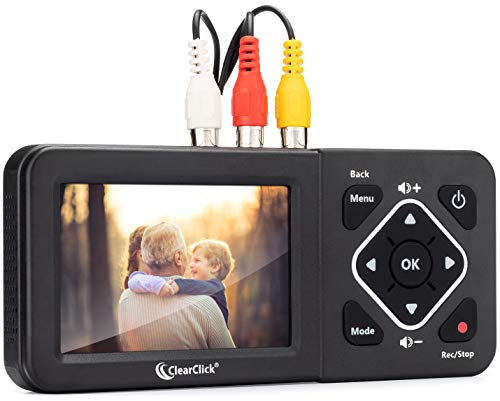
ClearClick 2.0 is a dedicated converter that records directly to USB flash drive or SD card, requiring a working VCR/camcorder and tapes. It supports SD 640×480 or 720×480 recording, without HD upscaling, and handles VHS, VCRs, DVD players, DVRs, camcorders, Hi8, and retro gaming systems. No computer or software is needed; the device prompts recording with a simple, driverless setup.
Portta VD22P VHS To Digital Converter

The VD22P model features a 5-inch HD LCD preview screen for real-time monitoring. It converts VHS, Hi8, Mini DV, DVD, and camcorder footage into MP4 at Full HD 1080p 60fps, with customizable image settings like brightness, contrast, and saturation. It supports live preview and easy adjustments to ensure color-balanced, high-quality recordings of memories.
Clariviews VHS To DVD Recorder
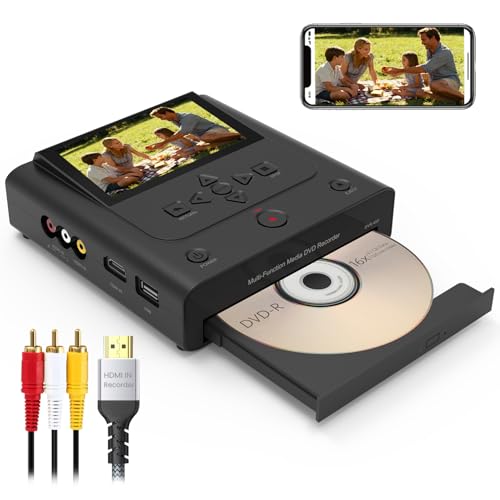
Clariviews offers a versatile recorder that handles a wide range of sources, including VCRs, DVD players, VHS cameras, smartphones, Apple TV, and more. It supports DVD±RW/R and CD±RW/R formats, enables easy file transfers via USB or memory cards, and provides HDMI input for direct digital capture from streaming devices or modern cameras. HDMI output allows playback on a TV with minimal signal loss.
VIXLW VHS To Digital Converter

VIXLW provides an analog-to-digital pathway for VHS, VCR, Hi8, mini DV, camcorders, and other legacy sources to MP4 format. It emphasizes Mac and PC compatibility, automatic NTSC/PAL detection, and driverless setup with simple software recommendations (OBS, PotPlayer, or QuickTime). Recordings are intended for easy editing and preservation in standard digital workflows.
Buying Guide
- Source compatibility: Ensure the device supports the exact analog formats you own (VHS, Hi8, Mini DV, camcorders, or gaming consoles) and has the right input options (RCA, S-Video, HDMI, or USB).
- Output formats and playback: Look for devices that record in widely used formats (MP4, MP3) and provide direct playback or easy transfer to computers and USB drives.
- Storage and media: Consider whether a unit records to USB, SD card, or internal storage, and verify supported capacities and power requirements for high-capacity drives.
- Ease of use: For beginners, a model with a built-in display, remote, and simple one-button transfer can reduce setup friction.
- Software and drivers: Some devices are “driverless” with direct USB recording, while others may require PC software. Decide if you prefer a plug-and-play approach or a more customizable workflow.
- Video quality and formats: Check if HD recording (1080p) is available or if SD-only recording is acceptable for your needs. Note that some devices do not upscale or improve original tape quality.
- One-time vs ongoing use: If you have a large archive, prioritize devices with reliable long-term support, easy file transfer, and robust format compatibility.
- Returns and guarantees: Choose products with clear warranty or return options to safeguard against non-working units or compatibility issues.
Choosing the right VHS-to-DVD pathway depends on your tape library, preferred workflow, and how you plan to store and share the digital copies. The options above cover a spectrum from simple plug-and-record converters to more flexible recorders with HDMI output and broad compatibility. Assess the input types you have, the output formats you want, and whether you value a built-in screen or remote control for easier operation.