Preserving family memories and valuable video archives often means converting old VHS tapes into modern digital formats. The following guide highlights five reliable VHS-to-digital converters that support various playback sources, offer simple plug-and-play setup, and store recordings on USB drives or larger storage. Each option emphasizes ease of use, compatibility with NTSC and PAL formats, and on-device preview so you can verify quality in real time.
Summary of Selected Products
| Product | Brand | Storage | Key Benefit | Input Formats |
|---|---|---|---|---|
| Portta VHS To Digital Converter | Portta | USB/TF (storage separate) | 3.0″ LCD preview, no PC required | AV/RCA, S-Video, AUX |
| ClearClick Video To Digital Converter 2.0 | ClearClick | USB Flash Drive or SD Card | One-button recording, simple workflow | VHS/VCR/Hi8/DVR/DVD/DVG |
| Portta VD22P VHS To Digital Converter | Portta | USB Drive | 5″ HD preview, direct MP4 output | VHS, Hi8, Mini DV, Camcorders |
| DigitPro VHS To Digital Converter 2.0 | DigitPro | USB/TF up to 512GB | One-Touch recording, auto format detection | VHS/VCR/DVD/Hi8/ camcorders |
| ClearClick Video To Digital Converter 3.0 | ClearClick | USB Flash Drive or MicroSD | Digitalize both video and audio sources | VHS/VCR/AV/Hi8, Camcorders, Cassette/Turntables |
Portta VHS To Digital Converter

The Portta unit functions as a converter/recorder and captures analog video and audio into digital formats. It records up to 1080P 30Hz and supports AV/RCA CVBS+R/L, S-Video, and AUX inputs. It is intended for direct recording to USB storage or TF cards and does not play tapes independently. The device includes a 3.0″ LCD preview screen and built-in speaker for on-device playback. It requires a separate storage USB drive or card of sufficient capacity.
Format options include MP4 video and MP3 audio, with NTSC and PAL standards supported. For best results, ensure proper connections to the selected input (CVBS R/L or AUX-IN) and unmute volumes in the settings. This model is ideal for users who want a compact, self-contained capture solution without a computer.
ClearClick Video To Digital Converter 2.0
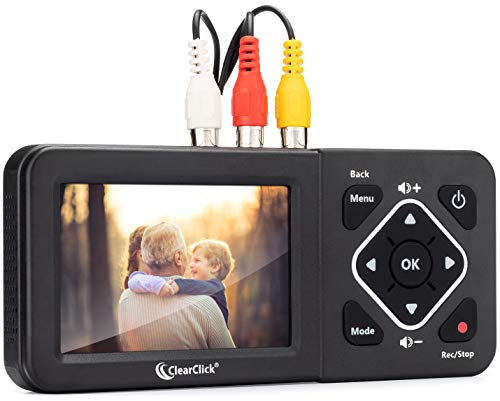
ClearClick’s second-generation converter is designed to digitize video from VHS, VCRs, Hi8, camcorders, and other sources. It records at SD resolutions (640×480 or 720×480) to USB flash drives or SD cards—no computer required. It does not upscale to HD and cannot capture from modern HDMI sources. A working VCR/camcorder and tapes are required. This option is useful for users who want a straightforward, button-driven workflow with direct USB/SD recording.
Portta VD22P VHS To Digital Converter

The Portta VD22P emphasizes a built-in 5″ HD LCD preview screen, allowing real-time monitoring as you capture. It outputs to MP4 and supports full HD capture at 60fps, preserving motion detail. Supported inputs include VHS, Hi8, Mini DV, DVD, and various camcorders. This model is well-suited for users who value a larger on-device display and direct MP4 storage, reducing the need for external monitors during capture.
DigitPro VHS To Digital Converter 2.0

DigitPro’s model offers one-touch digital conversion from a variety of analog sources, including VHS, VCR, DVD, Hi8, and camcorders. It records up to 1080P 30Hz and supports MP4, MP3, and WAV formats with USB/TF storage up to 512GB. A 3.5-inch HD preview screen enables real-time viewing, and the unit supports auto-pause/resume during signal loss and scheduled recording. It provides a straightforward, plug-and-play workflow without a computer.
ClearClick Video To Digital Converter 3.0

The ClearClick 3.0 bundle expands compatibility to include cassette tapes and turntables in addition to VHS, Hi8, and camcorders. It records video in MP4 and audio in WAV/MP3, with outputs to USB drives or microSD cards. The system requires a working VCR/camcorder and tapes, and it emphasizes a no-computer, on-device workflow. The inclusion of cassette-to-digital capabilities makes it versatile for multi-format archives.
Buying Guide
- Storage and speed: Look for devices that support USB drives or SD cards with sufficient capacity. Larger drives reduce the need for frequent transfers.
- Preview and monitoring: A built-in LCD or larger preview screen helps verify framing and quality during capture, reducing wasted tapes.
- Input compatibility: Ensure the unit supports CVBS/RCA, S-Video, and AUX inputs for broad source compatibility with VCRs, camcorders, and retro gaming consoles.
- Format options: Check supported video resolutions (1080P vs SD), frame rates, and audio formats. MP4 with LPCM audio is common and broadly compatible.
- Power and stability: Some models require their own power supply for high-capacity USB storage; consider redundancy and reliability for long sessions.
- Software and drivers: Many options are plug-and-play without PCs, but some users may prefer software-based editing workflows. Consider future needs for editing or streaming.
- Multi-format support: If you have cassette tapes or vinyl audio, choose models that also capture audio from cassette or record players.
- Reliability and reviews: Compare user feedback on playback quality, ease of use, and durability, especially for longer captures or archival projects.
- Budget alignment: Prices vary; balance features such as built-in displays, supported formats, and storage flexibility against your budget.
- Warranty and support: A solid warranty and accessible customer support can be valuable for troubleshooting and updates.