The compact guide below compares top USB-powered sound bars suited for desktops, laptops, and monitors. Each pick supports easy setup and space-saving placement. The summary table highlights key features at a glance to help you select the right USB sound bar for work, gaming, or streaming.
| Product | Connectivity | Special Feature |
|---|---|---|
| Cyber Acoustics CA-2890 | USB (single cable) | Clamp mount, volume & mute controls |
| LENRUE A39PRO | USB power + 3.5mm aux | 10W stereo, headphone passthrough |
| Nylavee HiFi Sound Bar | Bluetooth & Aux | 4 speaker units, dual bass diaphragms |
| SOULION R50 | USB power + 3.5mm + Bluetooth | RGB lighting modes |
| Bluedee USB/Type-C Soundbar | USB/Type-C (audio & power) + Bluetooth | HiFi drivers, anti-noise tech |
Cyber Acoustics USB Speaker Bar (CA-2890)

This model is a USB-powered speaker that uses a single USB cable for both power and audio input, making setup simple for PC, Mac, or Chromebook. The bar clips to the bottom of most monitors and includes accessible controls for volume, mute (with LED), and play/pause. The compact cabinet design projects sound forward to improve perceived stereo imaging.
Features listed include single-cable USB connection, clamp mounting or freestanding placement, and built-in controls. The speaker emphasizes convenience and desk tidiness, suitable for users seeking a space-saving upgrade from built-in monitor audio.
LENRUE Computer Speakers A39PRO

LENRUE’s A39PRO is a wired sound-bar that combines USB power with a standard 3.5mm AUX connection for broad compatibility. The speaker uses an upgraded 2x5W configuration to deliver stated 10W stereo output, aiming for clear, noiseless audio for movies, music, and gaming.
Notable features include audio passthrough for headphones via the speaker, AUX microphone plug support, and plug-and-play simplicity. This option is practical for desks that need a reliable wired audio path and headphone connectivity without pairing steps.
Nylavee HiFi Computer Sound Bar
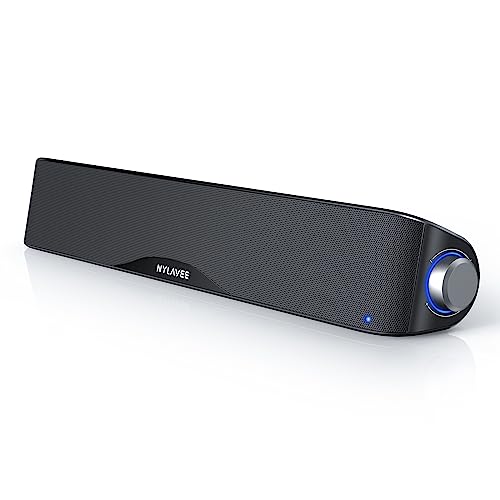
The Nylavee sound bar features Bluetooth and Aux connectivity and a multi-driver layout with 4 speaker units plus 2 bass diaphragms. The design aims to improve both treble clarity and low-end presence through a unique cavity and double-layer neodymium magnet drivers.
Features include dual connection methods, enhanced bass diaphragms, and construction with mica-fiber diaphragms for durability. This model targets users who want a richer acoustic profile and wireless streaming capability for varied multimedia use.
SOULION R50 Bluetooth Computer Speakers

The SOULION R50 is a USB-powered sound bar with Bluetooth and a 3.5mm AUX option for audio. It includes 4 dynamic LED lighting modes—gradient, breathing, rhythm, and fixed—controllable via onboard buttons. Power is provided by USB while audio selection is toggled with the “M” mode button.
Listed features highlight LED customization, Bluetooth pairing memory, and compatibility across PCs, tablets, and phones. The R50 suits users who want modest audio improvements plus visual lighting effects for a desk or gaming setup.
Bluedee Computer Speakers USB/Type-C

Bluedee’s USB/Type-C soundbar emphasizes HiFi stereo performance with advanced anti-noise technology and HD full-range drivers. It supports single-cable USB or Type-C connections that handle both audio and power, simplifying cable management on modern laptops and desktops.
Highlighted features include plug-and-play operation, Bluetooth mode when USB power is connected, and built-in anti-noise processing. This model appeals to users who prefer a clean desk setup and a focus on vocal clarity and instrument separation.
Buying Guide: How To Choose A USB Powered Sound Bar
Purpose And Use Case — First, identify the primary use: voice calls, music, gaming, or movies. Speakers tuned for clear midrange and vocal presence are best for calls and streaming, while models with larger drivers or bass diaphragms suit music and gaming.
Connectivity Options — Confirm whether you need single-cable USB audio & power (clean setup for laptops), or separate audio (3.5mm) plus USB power. Bluetooth adds wireless convenience, but may introduce latency; useful for general media but consider wired for gaming.
Mounting And Size — Many sound bars clip to monitors to save desk space. Check clamp compatibility and whether the unit can also rest on the desk. Compact bars trade low-end bass for convenience; full-size bars or external subwoofers provide stronger bass.
Controls And Convenience — Onboard volume, mute, and play/pause controls help when the soundbar is clipped to a monitor. LED indicators and simple mode switching improve usability. Consider models with headphone passthrough if you switch between private listening and speakers.
Audio Quality Metrics — Look for multi-driver arrays, separate bass diaphragms, or neodymium magnets for improved clarity. Manufacturer claims like “HiFi” should be evaluated against driver count, enclosure design, and real-world reviews if available.
Noise Reduction And Signal Processing — Anti-noise or digital processing can reduce static and improve clarity, particularly when using USB as the audio transport. For critical listening, minimal processing and high-quality drivers generally provide a more natural sound.
Lighting And Aesthetics — RGB or LED lighting can enhance a gaming desk but adds little to audio performance. If desk ambiance matters, choose a model with customizable modes that match your setup without compromising core audio features.
Compatibility And Power Source — Ensure the sound bar supports your device’s ports: USB-A, USB-C, or requires a USB audio adapter. Some USB-powered bars rely on host drivers for digital audio; verify plug-and-play support for your operating system.
Durability And Materials — Look for solid build materials and diaphragms (e.g., mica-fiber) for longevity. Lightweight plastic units are common—inspect mount mechanisms and cable quality for long-term reliability.
Value Considerations — Balance audio performance, connectivity, and features like RGB lighting or clamp mounts. Prioritize features that match your main use case: clear voice for work, low latency for gaming, or richer bass for music and movies.