Finding the right speaker for your computer depends on desk space, power source, and sound goals. Below is a quick comparison of five compact computer speakers selected for desktop and laptop use, followed by detailed specs and objective reviews to help you choose.
| Product | Form Factor | Connection | Notable Feature |
|---|---|---|---|
| OGUPGX Computer Speakers | Clip-On / Desktop | USB | Monitor Clip, USB-C adapter |
| LIELONGREN USB Sound Bar | Mini Sound Bar | USB | Dual 3W Drivers, Passive Radiator |
| Amazon Basics Stereo 2.0 | Pair Of Wired Satellites | 3.5mm Aux + USB Power | Inline Volume Control |
| Tylubio Bluetooth & USB Speaker | LED Soundbar | Bluetooth / USB | LED Modes, 2x5W Output |
| XKX Computer Soundbar | Clip-On / Soundbar | USB | Adaptive Channel Switching, Touch Control |
OGUPGX Computer Speakers

The OGUPGX speaker is a compact USB-powered clip-on model designed to attach to monitor bezels or sit on a desk. It uses two 1.4-inch internal magnetic drivers and a single USB cable for power and audio transmission. The design emphasizes convenience and space saving with a spring-loaded clip that fits most monitors up to 0.78 inches thick.
Key listed features include loud sound relative to its size, plug-and-play compatibility with most computers via USB, and a USB-C to USB adapter included. The product notes limited bass due to the small cavity, and that it requires the USB port on a computer or laptop for operation.
LIELONGREN USB Sound Bar
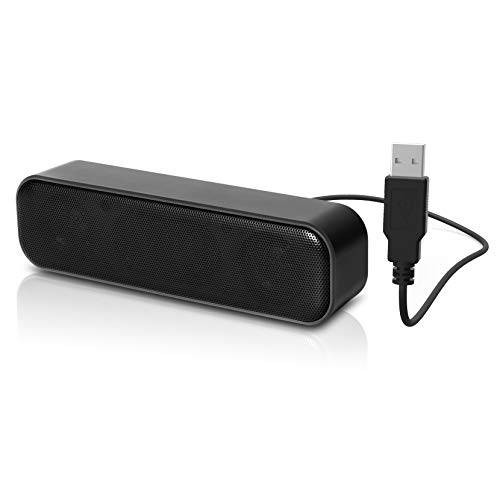
This mini sound bar connects via a single USB cable for both audio and power, aimed at Windows PCs. It has built-in dual 3W high-excursion drivers and a passive radiator to enhance bass and dynamic range relative to other compact USB speakers.
Specifications mention no physical volume knob — volume adjustments are handled through the computer. The speaker prioritizes a tidier cable setup and louder output compared to ultra-compact clip speakers, making it suitable for small desktops where a horizontal footprint fits under the monitor.
Amazon Basics Stereo 2.0

The Amazon Basics Stereo 2.0 is a traditional pair of wired satellite speakers with 3.5mm aux input and USB power. They include an inline volume control for quick access and are explicitly designed for amplifying PC or laptop audio without complex setup.
Being a set of two separate speakers, they provide genuine stereo separation and flexibility for placement. This model is appropriate when a basic, reliable wired solution is preferred, and when 3.5mm connections are available on the source device.
Tylubio Bluetooth & USB Speaker

Tylubio offers a multifunctional speaker with Bluetooth and USB input, upgraded 2x5W drivers, and four LED lighting modes. Controls are integrated into a multifunction knob that manages input switching, media control, and LED settings.
Its feature set targets users wanting wireless pairing plus a visual element for gaming or multimedia setups. The listed benefits emphasize clear stereo sound and easy-access controls for mode switching and playback management.
XKX Computer Soundbar

The XKX soundbar focuses on loud sound with rich bass using dual ultra-magnetic drivers and passive radiators. It includes an adaptive-channel-switching G-sensor to maintain correct left-right orientation when clipped to different monitor edges.
Front touch controls allow muting and volume adjustments. The product highlights a balance between compact monitor-mounted convenience and an emphasis on lower-frequency response for fuller audio than many tiny clip-on units.
Buying Guide: Choosing Computer Speakers
When selecting a speaker for a computer, evaluate functional and acoustic aspects objectively to match your setup and priorities.
- Connection Type: USB-powered speakers simplify power and audio on many PCs, but require USB audio support. 3.5mm aux maintains compatibility with TVs and some consoles. Bluetooth provides wireless convenience but adds potential latency for gaming.
- Form Factor: Clip-on and soundbars save desk space and fit under monitors. Paired satellite speakers offer better stereo separation but need space for placement.
- Sound Goals: For clearer mids and vocals, small drivers are acceptable. For bass-heavy listening, look for passive radiators or add a subwoofer; tiny enclosures will limit low-frequency extension.
- Controls & Usability: Inline or on-device volume controls provide quick access. Some compact models omit physical knobs, relying on OS volume control—consider your preference.
- Compatibility & Plug-and-Play: Confirm the speaker supports your OS and connection (USB audio vs. analog 3.5mm). Some USB speakers require the computer USB port, not a monitor pass-through.
- Placement & Orientation: Adaptive-channel or G-sensor features ensure left-right channels remain correct when speakers are clipped upside down or to the top of a monitor.
- Lighting & Extras: LEDs and multifunction knobs add aesthetics and convenience but are secondary to audio performance. Decide if visual effects are desired in your workspace.
- Desk Clutter & Cable Management: Single-cable solutions reduce mess. Glued or integrated cables simplify routing but reduce flexibility for replacements.
- Power & Volume Needs: Check wattage or driver specs (e.g., 3W, 5W). Higher nominal output can offer louder playback but is only one factor in perceived loudness and clarity.
- Use Case: For gaming, consider latency and stereo imaging. For video calls, prioritize voice clarity. For music, consider stereo separation and bass capability.
Comparative perspectives:
- Space-Constrained Desks: Clip-on or slim soundbars (OGUPGX, XKX, LIELONGREN) provide minimal footprint.
- Best Stereo Separation: Two-piece systems (Amazon Basics Stereo 2.0) allow wider placement and clearer stereo imaging.
- Wireless Flexibility: Bluetooth-enabled models (Tylubio) offer device pairing beyond the computer but may have trade-offs in latency.
- Enhanced Bass: Models with passive radiators (LIELONGREN, XKX) deliver stronger low-frequency performance than similarly sized sealed drivers.
Use these considerations to match speaker features to your workspace, source device, and listening preferences. Each product listed targets a different balance of convenience, sound, and placement, so prioritize the attributes that matter most for your computer setup.