Find soundbars with optical or digital inputs for improved TV audio clarity and easy connections. Below is a concise comparison of the five selected models that include digital (optical/Toslink) or HDMI ARC inputs suitable for TVs and home theater setups.
| Model | Key Digital Inputs | Configuration |
|---|---|---|
| Polk Audio Signa S2 | HDMI ARC, Optical, AUX | 2.1 with Wireless Subwoofer |
| PHILIPS B5109 | Optical (Toslink), HDMI (varies by SKU), BT | 2.0 Channel |
| Sony HT-S400 | Optical, HDMI (ARC supported) | 2.1 with Wireless Subwoofer |
| RAINEVERRY 5.1 System | HDMI, Optical | 5.1 with Wireless Sub + Rear Speakers |
| VIZIO 5.1 Soundbar SE | Optical, HDMI (ARC), Bluetooth | 5.1 with Wireless Sub & Surround |
Polk Audio Signa S2 Sound Bar & Wireless Subwoofer
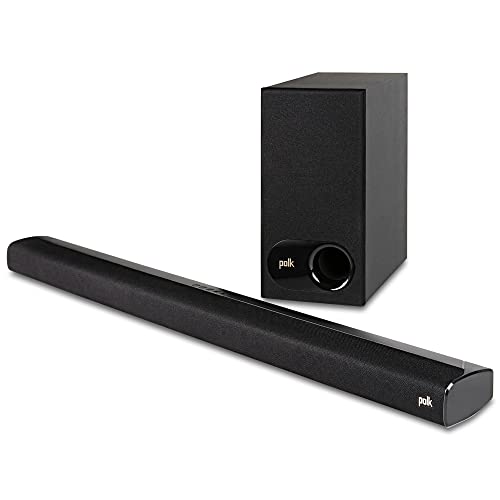
The Polk Signa S2 is an ultra-slim 2.1 soundbar that supports multiple connection types including HDMI ARC and optical digital input, making it compatible with most modern and older TVs. Polk’s VoiceAdjust technology is designed to boost dialogue clarity without altering overall tonal balance. The included wireless subwoofer enhances low-frequency output while the slim chassis avoids blocking IR sensors or the TV display edge. Setup offers both digital and analog options for flexible integration with different sources.
Key feature references: dual digital inputs (HDMI ARC & optical), Dolby Digital decoding, compact design, and wireless subwoofer for added bass extension. This model is commonly chosen for tight spaces where digital optical input is required for audio output from TV or set-top boxes.
PHILIPS B5109 SoundBar For TV

The PHILIPS B5109 is a 2.0-channel soundbar that lists Dolby Digital Plus and DTS Virtual:X processing; it typically offers optical (Toslink) input alongside Bluetooth LE audio. The unit focuses on straightforward audio enhancement—improving dialogue intelligibility and providing selectable EQ presets via remote or app. Its digital optical compatibility makes it a direct replacement for TV speakers when ARC is not available or when a separate digital output is preferred.
Referencing features: multiple EQ modes, Night Mode for low-volume clarity, and app control. The B5109 suits setups that require an optical connection from legacy TVs or audio sources while retaining simple customization for different content types.
Sony HT-S400 2.1ch Soundbar With Wireless Subwoofer

The Sony HT-S400 is a 2.1ch soundbar that supports optical digital input and often includes HDMI ARC on compatible TVs. Sony’s S-Force PRO Front Surround and Dolby Digital decoding emulate a wider soundstage, and the included wireless subwoofer handles low-frequency content. The design emphasizes clear dialogue and simple operation using the bundled remote and an OLED display for feedback.
Feature highlights: S-Force PRO processing for virtual surround, X-Balanced speaker units for improved pressure and clarity, and straightforward digital connections for TVs. This unit is a practical pick for consumers needing a clear optical feed from TV or media players.
5.1 CH Surround Sound Bar With Dolby Audio (RAINEVERRY)
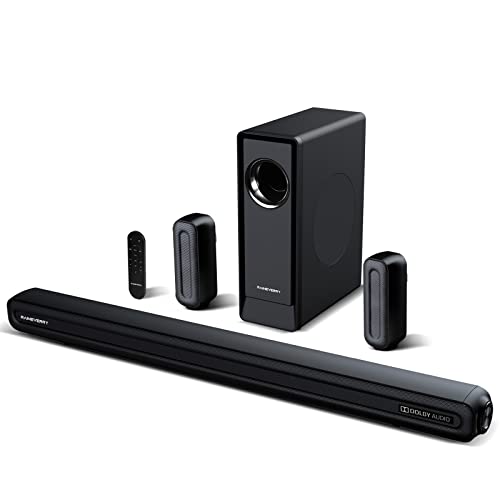
The RAINEVERRY 5.1 system provides a full multichannel setup with dedicated rear speakers, a large wireless subwoofer, and support for Dolby Digital Plus. It includes both HDMI and optical digital inputs, enabling flexible integration with 4K TVs and older devices. The DSP engine and multiple EQ modes aim to reproduce immersive surround effects for movies and gaming.
Feature references: 5.1 processing, wireless rear speakers, HDMI & optical connections, and extensive EQ/preset options. For users who need a digital audio input and desire discrete rear channels, this system offers multichannel realism when connected to a TV that outputs digital multichannel audio.
VIZIO 5.1 Soundbar SE With Wireless Subwoofer

The VIZIO 5.1 SE soundbar package includes a wireless subwoofer and two surround speakers, and supports optical digital and HDMI ARC inputs. The system advertises Dolby Atmos and DTS:X compatibility for virtualized height and surround effects when paired with appropriate content sources. VIZIO’s app control allows fine-tuning and firmware updates for improved interoperability.
Referenced features: dedicated surround speakers, app-based configuration, and multi-input compatibility. This model is tailored to users seeking a true 5.1 layout while using their TV’s digital audio outputs for multichannel feed or stereo optical output.
Buying Guide: Choosing A Soundbar With Digital Audio Input
When selecting a soundbar that supports digital audio input (optical/Toslink or HDMI ARC), consider the following factors to match the device to your TV and listening needs.
1. Type Of Digital Input
- Optical (Toslink): Common on many TVs and set-top boxes; carries compressed multichannel PCM and Dolby Digital. Choose this if your TV lacks HDMI ARC or eARC.
- HDMI ARC/eARC: Preferred when available — supports higher bandwidth audio formats and allows one-cable control and audio return. eARC required for lossless formats like Dolby TrueHD/Atmos passthrough.
- Coaxial: Less common on consumer soundbars but still a digital option on some older gear.
2. Channel Configuration And Room Size
- 2.0 / 2.1 Systems: Better for small-to-medium rooms; improved dialogue clarity with modest bass from a subwoofer in 2.1 setups.
- 5.1 And Surround Systems: Provide discrete rear channels and a fuller immersive experience—choose for larger rooms and movie-focused setups.
3. Codec And Processing Support
- Confirm support for Dolby Digital or Dolby Digital Plus if you use optical connections, and Dolby Atmos/DTS:X if you need virtual height effects via HDMI ARC/eARC.
- Virtual surround technologies (e.g., S-Force PRO, DTS Virtual:X) can widen the soundstage on 2.1 units but are not a substitute for true multichannel systems.
4. Dialogue Clarity And Voice Enhancement
- Look for features named Voice Adjust or dedicated dialogue enhancement to improve clarity on news, sports, and dialogue-heavy programs via digital inputs.
5. Connectivity And Compatibility
- Check TV output options: if your TV has only an optical output, confirm the soundbar’s optical input. If ARC/eARC is present, prefer HDMI ARC for expanded capabilities.
- Consider additional inputs (AUX/USB/Bluetooth) for connecting legacy sources or mobile devices.
6. Subwoofer And Bass Performance
- Wireless subwoofers add low-frequency impact without additional wiring complexity. For digital connections, ensure the soundbar’s processing can route bass management correctly.
7. Ease Of Setup And Control
- Consider whether the soundbar supports remote control learning, HDMI-CEC control via ARC, or a mobile app for EQ and updates. These features simplify integration with existing remotes and smart TVs.
8. Future-Proofing
- If you plan to upgrade TVs or sources, prioritize HDMI ARC/eARC compatibility and firmware-update support to maintain compatibility with newer audio formats.
Comparison Perspectives
- Minimal Setup & Optical-Only TVs: Select a soundbar with a reliable optical input and simple voice enhancement (e.g., PHILIPS B5109 or Sony HT-S400).
- Immersive Multichannel Experience: Choose a 5.1 system with HDMI and optical inputs for discrete surround channels (e.g., RAINEVERRY or VIZIO 5.1 SE).
- Space-Constrained Rooms: Ultra-slim 2.1 models with optical or ARC (e.g., Polk Signa S2) provide clarity without bulky cabinets.
- Future High-Bandwidth Audio: Prioritize devices with HDMI ARC/eARC for higher-resolution audio and simpler control when your TV supports it.