Finding a soundbar that includes a dedicated audio output or subwoofer out can simplify adding external speakers or integrating with receivers. This guide compares five soundbars and a key optical cable option to help you choose the right unit for a TV setup that needs an audio out connection.
| Product | Key Output/Connection |
|---|---|
| BESTISAN 50W Sound Bar | Sub Out, HDMI ARC, Optical, AUX, USB, Bluetooth |
| Yenjuty 100W Sound Bar (Detachable) | ARC, Optical, AUX, USB, Bluetooth |
| VIZIO 5.1 Soundbar SE | Wireless Subwoofer, HDMI/Optical (app control) |
| Polk Audio Signa S2 | HDMI ARC, Optical, AUX (various inputs) |
| Samsung HW-B630F 3.1 ch | Wireless Subwoofer, HDMI ARC, Adaptive Sound |
Sound Bar, BESTISAN 50 Watts Soundbar With Sub Out
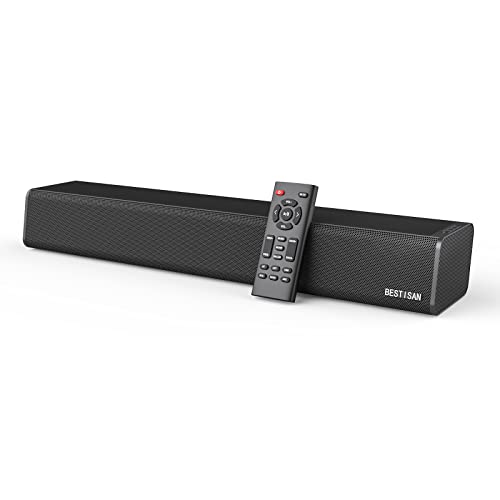
This compact 16-inch soundbar includes HDMI ARC, optical, AUX, USB and importantly a sub out for adding a passive subwoofer or powered sub with a line input. The bar uses two full-range speakers plus a bass tube and provides three equalizer modes (movie, music, dialogue) and adjustable bass/treble.
- Audio Outputs/Inputs: Sub Out, HDMI ARC, Optical, AUX, USB, Bluetooth 5.0.
- Performance Notes: DSP tuning with dedicated bass tube for extended low end; EQ presets for tailored listening.
- Use Case: Good for users who want an actual sub out to connect external subs or integration with powered bass modules.
Yenjuty Sound Bar 100W Detachable With ARC/Optical

The Yenjuty 100W model emphasizes flexibility with a 2-in-1 detachable design that converts to two tower speakers. Connectivity includes ARC, optical, AUX, USB and Bluetooth 5.3. While a dedicated line-level sub out is not specified, the bar’s detachable layout and multiple analog/digital inputs support a range of integration scenarios.
- Audio Inputs: ARC, Optical, AUX, USB, Bluetooth 5.3.
- Design: Detachable speakers allow stereo placement or a single-bar configuration for different room layouts.
- Integration Notes: If you require a physical sub out, confirm the model’s back-panel labeling; ARC mode supports TV remote control for volume in compatible setups.
VIZIO 5.1 Soundbar SE With Wireless Subwoofer

VIZIO’s 5.1 SE system includes a soundbar, two surround satellites, and a wireless subwoofer. Connections typically include HDMI and optical; the system relies on a wireless subwoofer rather than a line-level sub out. The product supports Dolby Atmos and DTS:X decoding for spatial audio when content and sources allow.
- Audio Connectivity: HDMI, optical, Bluetooth; wireless connection to subwoofer and surrounds.
- Output Consideration: No hardwired sub out is emphasized—subwoofer connectivity is wireless, which affects integration with third-party subs.
- Best For: Users wanting a packaged surround set with wireless sub while retaining HDMI/optical digital inputs for TV and sources.
Polk Audio Signa S2 Sound Bar & Wireless Subwoofer
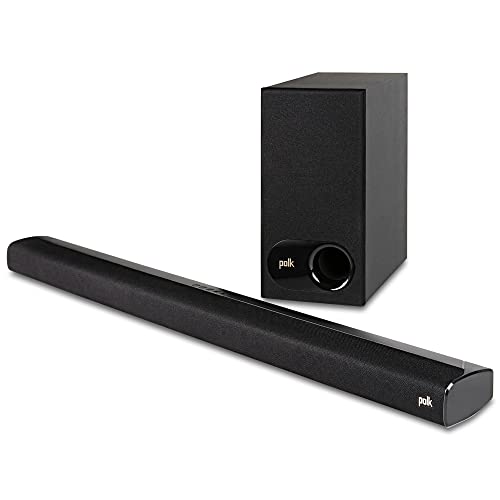
The Polk Signa S2 pairs an ultra-slim soundbar with a wireless subwoofer and supports HDMI ARC, optical and AUX inputs. It includes Polk’s VoiceAdjust technology to emphasize dialogue clarity. While the system ships with a wireless sub, the bar has multiple inputs for connecting legacy devices.
- Connections: HDMI ARC, optical digital, 3.5mm AUX, Bluetooth streaming.
- Subwoofer: Included wireless subwoofer; the primary unit does not advertise a dedicated line-level sub out for external powered subs.
- Suitability: Good for TVs where HDMI ARC is required and for users who prefer a compact, unobtrusive soundbar with a paired wireless bass module.
Samsung HW-B630F 3.1 ch Soundbar With Subwoofer

The Samsung HW-B630F offers a 3.1-channel layout with a dedicated center channel for dialogue, wireless subwoofer, and HDMI ARC connectivity. The unit highlights adaptive sound processing and control via a single Samsung TV remote when compatible. The design focuses on integrated wireless sub performance rather than providing a line-level audio out.
- Connectivity: HDMI ARC, optical likely available depending on model variants; wireless sub connection.
- Audio Features: Dedicated center speaker for voice clarity, spatial processing for multi-directional sound.
- Integration Notes: Best in Samsung TV ecosystems where one-remote control and adaptive sound tuning are priorities; limited if a physical sub out is required for aftermarket subs.
KabelDirekt TOSLINK – Optical Audio Cable (Accessory)

This optical (TOSLINK) cable is a common digital option to route audio between TVs, soundbars, receivers, and DACs. While not a soundbar, a quality optical cable is often required when using soundbars that expose an optical input or when a direct digital connection is preferred over HDMI.
- Key Role: Provides S/PDIF optical connection for TVs and soundbars without HDMI ARC or when isolating audio from interference.
- Advantages: Immune to electrical interference; useful for setups requiring long runs or clean digital audio between components.
- Use With: Any soundbar or TV that supports optical input/output when a physical line-level sub out is not available.
Buying Guide: Choosing A Soundbar With Audio Out
Selecting a soundbar when you need an audio out or sub connection requires attention to outputs, integration needs, and the rest of your gear. Below are the main considerations.
1. Identify The Exact Output You Need
“Audio out” can mean different things: a dedicated line-level sub out (RCA/subwoofer out), an optical S/PDIF output, or an HDMI ARC/eARC port that passes audio to and from devices. Confirm whether you need a physical RCA sub out to connect a powered sub or if wireless sub integration is acceptable.
2. Check Inputs And Outputs On Both Devices
Match the soundbar’s outputs to your TV, AVR, or external sub. If your TV lacks ARC/eARC, optical or analog outputs on the TV and corresponding inputs on the soundbar matter. If adding a receiver or external amp, verify the soundbar’s passthrough or pre-out options.
3. Wireless Subwoofer Vs. Line-Out
Many modern soundbars include a wireless subwoofer for simplicity. This is convenient but limits using a third-party wired sub. If you want to use a powered sub from a different brand or a pro subwoofer, a line-level sub out (RCA) is preferred.
4. Latency And Sync Considerations
When routing audio through multiple devices (TV → soundbar → external amp), watch for lip-sync or latency issues. HDMI ARC/eARC provides clocking and sync advantages over optical in many setups; optical is reliable but may lack advanced audio formats and some sync features.
5. Supported Audio Formats
Decide whether you need Dolby Atmos/DTS:X passthrough, Dolby Digital, or stereo PCM. If you rely on optical, note it may not support the highest bandwidth formats that eARC can pass.
6. Expandability And Future-Proofing
Consider whether you’ll later add surrounds, a powered sub, or integrate into a larger AV system. Soundbars with dedicated pre-outs or multi-channel outputs offer more flexibility than closed wireless ecosystems.
7. Remote Control And App Integration
Ease of use matters. Some soundbars allow TV remote control over ARC, or mobile app tuning. If you want single-remote convenience, prioritize ARC compatibility with the TV brand or universal remote mapping.
8. Room Size And Speaker Configuration
Room acoustics influence whether you need more channels or deeper bass. A 3.1 or 5.1 system with subwoofer suits larger rooms; compact bars suffice for small to medium spaces. If you plan to place a separate powered sub, ensure the soundbar’s sub out level control and crossover options exist.
9. Cables And Accessories
High-quality optical or HDMI cables improve signal reliability. For setups requiring an optical connection, choose a tested fiber optic cable; for eARC features, ensure HDMI cables are rated for high bandwidth.
10. Manufacturer Ecosystem
Some brands optimize soundbars for their TV lines (e.g., Samsung one-remote control). If you want seamless integration, matching the soundbar to your TV brand may simplify setup and controls.