Finding a media player that pairs seamlessly with a smart TV can elevate your viewing experience with sharper video, wider format support, and easier navigation. This guide highlights five versatile models that fit a range of budgets and needs, from region-free DVD players to 4K streaming boxes. Each option delivers solid performance for film nights, digital signage, or casual streaming, helping you choose the right balance of compatibility, upscaling, and storage support for your setup.
The following summary table presents the chosen products at a glance, including key strengths to help you compare quickly.
| Product |
|---|
| MEGATEK Region-Free HDMI DVD Player |
| fnetic 4K HD Digital Media Player |
| AGPTEK HDMI Media Player |
| JLZNLC 4K Media Player and HDD Enclosure |
| Electcom Pro DVD Player (Region Free) |
MEGATEK Region-Free HDMI DVD Player

The MEGATEK unit is a compact, region-free DVD player designed for TVs and modern entertainment systems. It upscales 1080p content via HDMI to deliver a crisper picture, making standard DVDs look closer to high-definition on a larger screen. With multi-region playback supporting regions 1–6 and both PAL and NTSC formats, it is suitable for disc collections from around the world. It also handles a broad range of formats beyond basic DVDs, including CD, CD-R, CD-RW, MP3, WMA, and JPEG files. Note that it does not support Blu-ray discs, so it suits older media libraries and light streaming needs. The device ships with HDMI, RCA cables, and a remote for convenient setup.
Key features to consider:
– 1080p HDMI upscaling for sharper standard-definition discs
– Multi-region DVD playback (regions 1–6) and PAL/NTSC compatibility
– Broad format support, including MP3, WMA, and JPEG, plus DVD, CD, and CD-R/RW
– Compact metal housing with included cables and remote
– Not compatible with Blu-ray discs
4K HD Digital Media Player by fnetic
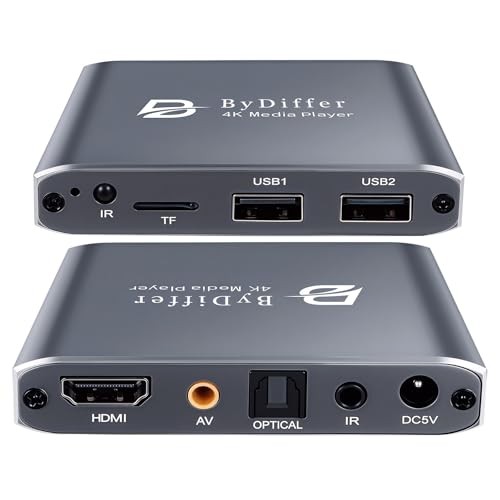
This 4K media player from fnetic is built to play videos, music, and photos from USB drives or microSD cards on any TV. It supports 4K resolution via HDMI for sharp, vivid visuals, and offers an Optical output for multi-channel audio up to 7.1, making it suitable for a home theater or digital signage setup. The device employs advanced H.265/HEVC decoding to deliver smooth 4K playback at 30Hz with high efficiency. It features dual USB 2.0 ports for connecting multiple devices, supporting FAT32, exFAT, and NTFS file systems. MAC-formatted drives are not supported.
Key considerations:
– 4K playback with H.265/HEVC decoding
– HDMI and Optical outputs for flexible audio-video setups
– Dual USB ports for external storage and peripherals
– Compatibility with FAT32, exFAT, and NTFS
– One drive read at a time; external drives may require switching
AGPTEK HDMI Media Player

The AGPTEK compact HDMI media player is designed for portability and travel use, yet it remains capable for home entertainment. It supports 1080p Full HD playback and a broad array of formats, including MKV, AVI, MP4, and more. The unit offers both HDMI and AV outputs, allowing use with modern HDTVs as well as older displays. Aluminum alloy construction enhances durability for on-the-go viewing, and the included AV output enables connecting external speakers for enhanced audio. Note that it does not list Blu-ray or 4K support, so it’s best for 1080p content on smaller setups or travel scenarios.
Key points:
– Ultra-compact, travel-friendly design
– 1080p playback across many common formats
– HDMI and AV outputs for wide compatibility
– Aluminum alloy body for durability
– No 4K support noted
JLZNLC 4K Media Player and HDD Enclosure

This 2-in-1 device combines a 4K media player with an HDD enclosure, enabling local playback from USB drives and SD cards while serving as a compact digital signage solution. It supports a wide range of video formats up to 4K 60fps via HDMI, including MP4 and MKV, and can display photos and music in compatible formats. The enclosure accepts 2″ to 3″ SATA drives, expanding storage for extensive media libraries. It emphasizes looping playback for signage and offers auto-start and auto-resume features. The setup is designed to be simple and affordable for multiple TVs or installations.
Key considerations:
– 4K playback with broad format support
– USB/SD card-based media and optional HDD enclosure
– Automatic playback with looping and resume options
– Signage-friendly features and rotation/landscape controls
– Compact, affordable solution for multi-TV environments
Electcom Pro DVD Player for TV and Elderly
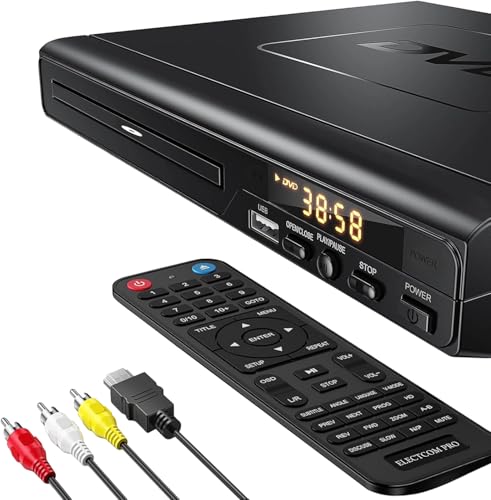
The Electcom Pro DVD player emphasizes region-free playback, making it a practical option for households with varied media sources. It is a HDMI-based player designed to integrate with TVs and home stereo setups, including a CD/USB compatibility set that supports a variety of formats for playback. While marketed as region-free, users should verify the exact disc compatibility and any firmware requirements. The device supports immersive 1080p video output with multiple connections for flexible speaker configurations. It is particularly suitable for elderly users and those seeking straightforward operation with essential features.
Important considerations:
– HDMI connection for high-definition output
– Region-free playback for diverse disc libraries
– Broad compatibility with CDs, DVDs, and USB formats
– Simple, compact, user-friendly design
– Clarify Blu-ray support status and firmware needs
Buying Guide: Key Purchase Considerations
- Content formats and upscaling: Evaluate whether you primarily watch DVDs, Blu-rays, or streaming apps. For older discs, a region-free DVD player with 1080p upscaling can extend your disc library; for modern content, a 4K-capable player or streaming box delivers higher fidelity.
- Video and audio outputs: Ensure the device has HDMI for modern TVs and consider Optical or Bluetooth audio if you want to route sound to a soundbar or receiver. Some models also offer AV outputs for older displays.
- Storage and media sources: If you store media on USB drives or SD cards, check the number of USB ports, supported file systems, and whether a drive can be read concurrently. For signage or large libraries, a model that supports external HDD enclosures is beneficial.
- Region compatibility: Region-free players are ideal if you own discs from multiple regions. Confirm the supported regions and any restrictions on certain disc formats like Blu-ray.
- Ease of use and setup: Look for automatic playback, resume features, and simple remotes. For non-technical users, a compact, straightforward interface is advantageous, especially in shared living spaces or elder-friendly setups.
- Streaming capabilities: If you want apps like Netflix, Prime Video, or YouTube, consider a streaming-enabled box with robust app support. For pure media playback, dedicated players without apps may suffice and offer simpler operation.
- Durability and design: If you need portable or signage-friendly devices, consider build quality, fan noise, and whether the unit fits your installation environment in terms of size and mounting options.
When choosing, balance regional compatibility, 4K or 1080p output, and storage needs against your TV’s inputs and audio system. Evaluate whether you prefer a compact, travel-ready player or a feature-rich device suitable for a home theater or signage setup. Real-world usage scenarios, such as family viewing, elderly accessibility, or commercial displays, should guide the final selection.