Discover versatile DVD players that play discs from any region, upscale standard-definition to near-1080p, and connect easily to modern TVs, projectors, or home theaters. This guide highlights five reliable options and explains what to consider when buying a region-free DVD player for a multi-region collection, elderly-friendly use, or travel-friendly setups. Each product listing includes key features to help you compare performance and compatibility at a glance.
| Brand | Model / Name | Region Capability | Notable Features |
|---|---|---|---|
| MEGATEK | Region-Free HDMI DVD Player | Multi-Region 1-6 | 1080p HDMI upscaling; USB playback; compact metal housing |
| Dynastar | Region Free Blu-Ray Player (Multi Region) | Region Free Blu-ray & DVD | Full HD 1080p upscaling; Regions A/B/C; multi-region DVD playback |
| Electcom Pro | DVD Players For TV With HDMI | All Regions | HDMI output; supports DVD, CD, USB; elderly-friendly design |
| JOVELL | DVD Player Region Free (Model-168) | All Regions | 1080p upscaling; multiple disc formats; includes cables |
| Majority | 2025 Model HDMI DVD Player | Region-Free | 1080p upscaling; USB input; compact mini design |
MEGATEK Region-Free HDMI DVD Player

MEGATEK builds a compact, durable player designed for universal compatibility. It upscales standard-definition content to Full HD via HDMI, enhancing picture quality for modern TVs. The device supports DVDs from all regions (1–6) and PAL/NTSC formats, making it ideal for travelers and households with diverse disc collections. In addition to DVD playback, it accepts CD formats and image or audio files via USB, broadening media options. A remote is included, simplifying operation for all ages. This model is not compatible with Blu-ray discs.
Dynastar Region Free Blu-Ray Player

This Dynastar player emphasizes true region-free flexibility for both Blu-ray and DVDs. It supports Blu-ray region A, B, and C as well as region-free DVD playback across all regions (0–8). The unit provides Full HD 1080p video with HDMI upscaling, giving standard DVDs a near-HD presentation. This makes it a strong choice for households with mixed Blu-ray and DVD libraries who want to maximize their current media without upgrading discs. It targets home theater setups while maintaining broad compatibility.
Electcom Pro DVD Players For TV
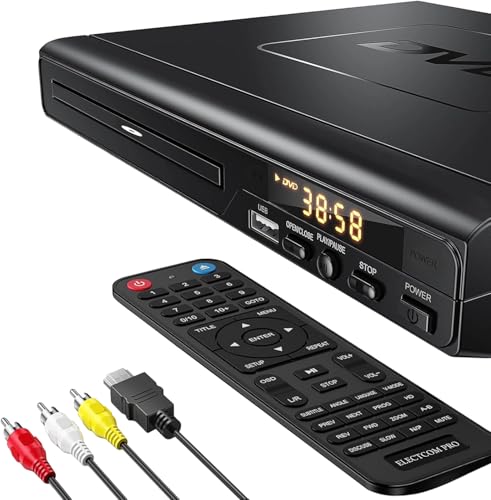
Electcom Pro positions this player as a practical choice for seniors or households seeking straightforward operation. It is a HDMI-equipped region-free option, capable of playing DVD and CD formats as well as USB media, including MP3, WMA, and photos. The design emphasizes compatibility with a variety of displays and sound systems while keeping setup simple. Note that this unit does not play Blu-ray discs, focusing on reliable DVD playback and easy connectivity for everyday use.
JOVELL Region Free DVD Player (Model-168)
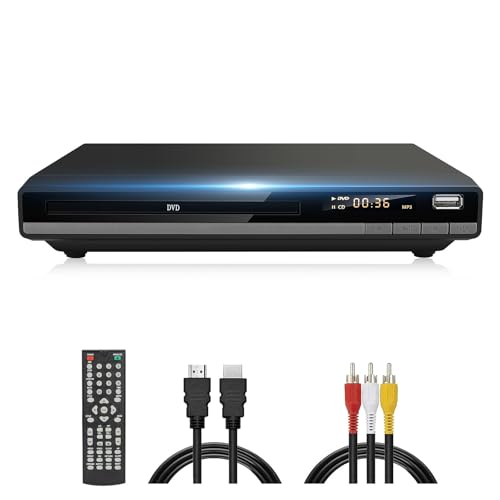
JOVELL’s Model-168 focuses on broad regional compatibility and upscaling convenience. It handles DVDs from regions 1–6 (with occasional CPRM caveats) along with CD, VCD, SVCD, and various DVD formats. The device emphasizes HDMI and AV outputs for flexible connections to TVs, projectors, or sound systems, delivering smoother color gradients and reduced motion artifacts on many standard-definition discs. It’s a compact option suitable for family rooms, kids’ spaces, or classrooms seeking dependable multi-region playback without Blu-ray support.
Majority 2025 Model HDMI DVD Player

The Majority 2025 model offers an upscaling HDMI connection to boost DVD images to near 1080p. It supports region-free playback across multiple formats, including DVD-ROM, DVD-R, DVD-RW, DVD+R/RW, and standard CD formats, plus USB video, audio, and photo playback. Its mini, space-saving design suits compact entertainment centers and travel setups. The unit comes with HDMI and RCA cables, a dedicated remote, and memory features that help resume playback across sessions, aligning with casual and multi-region viewing habits.
Buying Guide: Key Purchase Considerations
When choosing a non-region DVD player, consider compatibility with your existing media, TV, and sound system. Here are important factors to compare:
- Region-Freedom and Disc Formats: Ensure the player explicitly states multi-region DVD support (and, if needed, Blu-ray regions). Check supported disc formats, including DVD-R/RW, DVD+R/+RW, CD-R/CD-RW, and USB media support for MP3, JPEG, and video files.
- Video Resolution and Upscaling: Look for 1080p HDMI upscaling to improve older DVDs on modern displays. Upscaling quality varies; reviews can help gauge perceived gains.
- Connections: HDMI is the preferred primary connection for modern TVs; ensure the device includes RCA or AV outputs if you have legacy displays or sound systems.
- Remote and Usability: A well-designed remote, straightforward on-screen menus, and simple setup are important, especially for seniors or casual viewers.
- Build and Design: A compact, durable chassis is valuable for small living spaces or travel use. Metal housings often indicate sturdiness.
- Player Limitations: Some units do not play Blu-ray discs or may have CPRM restrictions on certain regions. Confirm compatibility with your disc collection before purchase.
- Power Consumption and Noise: Consider idle energy use and drive noise during disc loading or playback, especially in quiet rooms.
- Warranty and Support: Check warranty length and availability of customer service in the United States to resolve potential issues quickly.
For most households seeking broad compatibility with a mix of older DVDs, CDs, and USB media, any of the highlighted models provide solid regional freedom, reliable upscaling, and straightforward operation. Compare the included cables, remotes, and region coverage to identify the best fit for your home theater setup and media library.