Choosing a monitor with built-in speakers is a convenient way to save desk space while enjoying clear audio without the need for extra equipment. Whether you’re working from home, gaming, or attending video conferences, these monitors offer visuals and sound to match your needs. Below is a summary table of some top options available:
| Monitor | Screen Size | Resolution | Special Features |
|---|---|---|---|
| HP 24mh FHD | 23.8″ | 1920 x 1080 (FHD) | IPS panel, height/tilt adjustment, VESA mount |
| ASUS 27” BE279QFK | 27″ | 1920 x 1080 (FHD) | Frameless, webcam, mic array, 100Hz refresh |
| ASUS 27” BE279QSK | 27″ | 1920 x 1080 (FHD) | Adjustable webcam, multiple inputs, ergonomic |
| HP 27h Full HD | 27″ | 1920 x 1080 (FHD) | Dual speakers, thin bezel, height/tilt adjustable |
| SANSUI 24” Curved Monitor | 24″ | 1920 x 1080 (FHD) | Curved 1500R, USB-C, 100Hz, 1ms response |
HP 24mh FHD Computer Monitor With Built-In Speakers

The HP 24mh FHD Monitor offers a 23.8-inch Full HD IPS display, providing sharp and vibrant visuals with excellent color accuracy and wide 178° viewing angles. It delivers a smooth 75Hz refresh rate, suitable for everyday use and light gaming.
This model’s design is ultra-slim to maximize desk space, and it supports height and tilt adjustments for ergonomic comfort. The built-in speakers add convenience for casual listening, video calls, and multimedia playback. VESA mounting allows for versatile setup options.
ASUS 27” 1080P Video Conferencing Monitor With Speakers

This ASUS 27-inch Monitor is designed especially for video conferencing and online learning. It includes an integrated Full HD webcam, a mic array, and stereo speakers, making it an all-in-one solution for professional and personal communication.
It features a frameless IPS display with 99% sRGB color accuracy and a 100Hz refresh rate, providing smooth and vibrant visuals. Adjustable height and ergonomic design support comfortable long-lasting use. Connectivity is flexible with HDMI and DisplayPort options.
ASUS 27” Full HD Video Conference Monitor With Webcam

The ASUS BE279QSK 27-inch features an adjustable 2MP Full HD webcam, a mic array, and stereo speakers, making it ideal for remote work and video calls. Its frameless IPS panel displays rich, accurate colors over wide viewing angles.
This monitor includes DisplayPort, HDMI, VGA, and USB upstream ports, allowing extensive connectivity to multiple devices. Its ergonomic height adjustment and wall mount compatibility provide flexible workspace arrangements.
HP 27h Full HD IPS Monitor With Dual Speakers
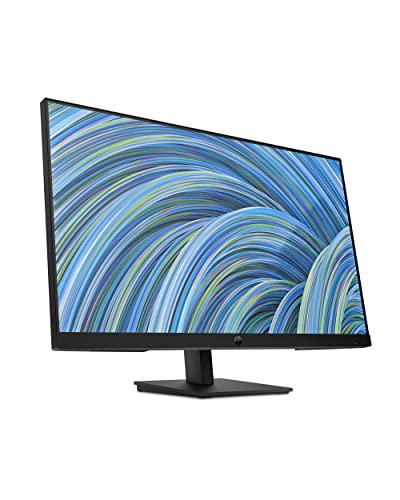
The HP 27h sports a 27-inch Full HD IPS display with a sleek 3-sided micro-edge bezel design, ensuring an immersive viewing experience. With a 75Hz refresh rate, the visuals remain smooth for general productivity tasks.
It is equipped with built-in dual speakers, amplifying audio for multimedia and calls. The monitor supports 100mm height and tilt adjustments to suit hybrid work environments. Its modern styling complements home or office setups.
SANSUI 24 Inch Curved USB-C Monitor With Built-In Speakers

The SANSUI 24″ Curved Monitor features a 1500R curved screen for immersive visuals and less eye strain. Its USB Type-C connectivity supports easy connection with laptops and mobile devices.
With a 100Hz refresh rate and 1ms response time, this monitor suits both gaming and office work. The screen displays 100% sRGB colors and has a 3000:1 contrast ratio, combined with built-in speakers for a streamlined multimedia experience.
Buying Guide: How To Choose The Best Monitor With Built-In Speakers
Display Quality and Size
Consider screen size based on your workspace and usage. Most selections range from 24 to 27 inches, balancing detail and comfort. Look for Full HD resolution (1920×1080) or higher depending on your needs. IPS panels offer better colors and viewing angles.
Audio Performance
Built-in speakers vary in quality. For clear video calls and casual multimedia, standard integrated speakers suffice. If audio fidelity matters (e.g., gaming, entertainment), check speaker specifications or consider separate audio devices.
Ergonomics and Adjustability
Height, tilt, and swivel adjustments help maintain good posture and comfort. Monitors with VESA mount compatibility offer flexible mounting options fitting your desk setup.
Connectivity Options
Multiple input ports such as HDMI, DisplayPort, USB-C, and VGA enhance compatibility with different devices. USB-C provides convenient single-cable solutions, especially for laptops.
Additional Features
Some monitors come with built-in webcams and microphones, ideal for video conferencing. Higher refresh rates (75Hz and above) provide smoother motion, beneficial for gaming and video playback.
Usage Scenarios
- Office Work: Focus on ergonomic design and clear visuals with decent speakers for calls.
- Gaming: Look for minimum 100Hz refresh rate, low response time, and good color reproduction.
- Video Conferencing and Remote Learning: Integrated webcam, mic, and speakers are highly advantageous.