For families and collectors looking to preserve memories and enjoy legacy media on modern TVs, the right mini DV and analog-to-digital tools are essential. This article highlights five top options that help you digitize, store, and enjoy old tapes on your TV or digital displays. Each choice focuses on ease of use, compatibility, and reliable results, making it easier to select a device that fits your setup and preferences.
| Product | Brand | Best For | Key Strength |
|---|---|---|---|
| Portta VHS to Digital Converter (B0D8XGYZ8L) | Portta | All-in-one capture with LCD preview | Direct recording to USB/SD with 1080p capture |
| VHS to Digital Converter (B0C5R8CTKT) | VIXLW | PC/Mac compatibility | Plug-and-play RCA/S-Video capture to USB |
| Sony DVC60PRL Mini DV Tape | Sony | Original mini DV media | Premium Sony tape for archival use |
| Portta VHS to Digital Converter (B0F6Y3YBC5) | Portta | Budget digital conversion | 1080P 30Hz capture via USB/SD |
| UNISHEEN Convert VHS to Digital | UNISHEEN | Broad format support | 1080P capture with wide input compatibility |
The selections below are organized to help you compare compatibility, storage options, and ease of use. Each entry includes a direct link to Amazon for quick access, along with key features highlighted to match typical home-TV setups and archival needs.
Portta VHS To Digital Converter With LCD Preview

This Portta model acts as a combined converter, recorder, and capture box, designed to digitize analog video and audio into digital formats. It records at up to 1080P 30Hz and supports CVBS/RCA, S-Video, and auxiliary inputs for flexible connections to VCRs, camcorders, and similar devices. It does not play tapes on its own, but it is ideal for capturing content directly to USB drives or SD cards via its built-in LCD preview screen and speaker. The device stores outputs in MP4 video and MP3 audio formats, with standard TV formats including NTSC and PAL. It’s a plug-and-play solution that avoids the need for a computer or software installation, though power management and input selection should be confirmed before use.
Key considerations: ensure you’re using the proper input (CVBS/RCA or AUX), verify volume levels in settings, and provide adequate power when using high-capacity USB storage. If you’re building a home archive, this model simplifies the digitization workflow with direct-to-storage capabilities and on-device previews.
VIXLW VHS To Digital Converter For PC And Mac

This video capture card supports transferring video and audio from VHS, VCR, Hi8, Mini DV tapes, and other analog sources to a PC or Mac via RCA or S-Video. The RCA-to-USB conversion provides HD 720P output for digital archiving or editing. Its plug-and-play nature means no additional software or drivers are required, simplifying setup for many users. It’s a practical choice if you mainly plan to edit or store captured video on a computer, and you’ll benefit from straightforward connectivity to a modern PC or laptop.
Key considerations: compatibility with your operating system, the quality of the capture stream, and how you’ll store and manage digital files after capture. This option balances simplicity with reliable performance for a home digitization project.
Sony DVC60PRL Mini DV Tape 60 Min
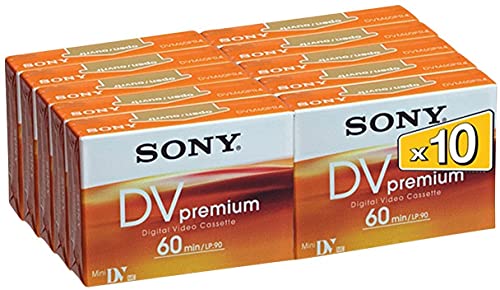
For those who still work with original mini DV media, this Sony DVC60PRL 60-minute tape is a premium option. Designed for archival use, it delivers reliable data integrity and compatibility with legacy camcorders that record to Mini DV cassettes. While not a converter itself, pairing high-quality tapes with a capable Mini DV camcorder or deck is essential for preserving footage that may later be digitized with one of the capture devices listed above.
Key considerations: storage environment to prevent magnetic deterioration, compatibility with your Mini DV player or camcorder, and whether your digitization workflow includes a separate capture step using a converter. This tape choice is about long-term reliability and compatibility with traditional Mini DV gear.
Desobry All Region Mini DVD Player

This compact DVD player supports HDMI and AV outputs, making it a versatile bridge for modern TVs and older displays alike. It handles a wide range of formats, including MPEG and AVI video files from USB drives or TF cards, and can play discs from different regions. If your plan includes viewing digitized files on a TV, this player provides a simple, all-region option for playback directly from flash storage or discs. It’s especially useful for households with diverse media libraries and region-specific content.
Key considerations: ensure your TV’s input options align with the player’s outputs (HDMI vs. AV), the supported file formats on USB/TF storage, and whether you need regional playback flexibility for a mixed media library.
Portta VHS To Digital Converter With 128GB USB Drive

This Portta variant includes a 128GB USB 3.0 flash drive to streamline the digitization process. It records analog video and audio to MP4 video and MP3 audio formats, supporting multiple TV standards (NTSC, PAL). The device functions as a standalone converter/recorder/capture box with a 3.0″ preview LCD and built-in speaker, enabling direct playback of captured videos. It’s a convenient, compact solution for users who want to minimize extra equipment and maximize storage space in a single unit.
Key considerations: verify storage needs against your expected capture size, confirm power requirements for sustained use, and ensure the included drive is sufficient for your initial projects. This option suits quick-start digital archives with a ready-to-go package.
UNISHEEN VHS To Digital Converter

The UNISHEEN converter is positioned as a broadly compatible device for digitizing video across a spectrum of older media formats, including VHS, VCR, DV tapes, Hi8, and Mini DV, with compatibility extending to gaming consoles and other analog sources. The device emphasizes an intuitive, plug-and-play experience and support for standard 1080P 30Hz captures, along with MP4 video and MP3 audio formats. The broad device support makes it appealing for multi-format archiving projects and for households with diverse analog collections.
Key considerations: ensure the device supports the exact input types you own (RCA, S-Video, etc.), confirm storage and power needs for large capture sessions, and consider how you’ll organize and preserve digital assets after capture.
Buying Guide: Key Purchase Considerations For TV Viewing And Archival Digitization
- Input compatibility: Check whether the device supports your legacy sources (RCA/CVBS, S-Video, AUX) and whether you plan to connect to a TV, PC, or standalone display.
- Output format and storage: Prefer devices that save in widely compatible formats (MP4 and MP3). Consider built-in storage or USB/SD card support for flexible archiving.
- Ease of use: For non-technical users, plug-and-play options with clear on-device previews reduce setup friction. A built-in LCD screen and speaker can assist in quick reviews without a computer.
- Quality and resolution: Aim for 1080P 30Hz capture when possible to maximize fidelity of older tapes, while acknowledging that some devices may cap at lower yields depending on input.
- Software independence: Devices that do not require PC software simplify the workflow but may limit advanced editing capabilities. Consider a mixed workflow if you plan to edit on a PC later.
- Power and portability: If you plan to digitize away from power outlets, choose models with robust power options or powered USB hubs. Portability matters for on-site digitization projects.
- Media compatibility: If you own a mix of VHS, Mini DV, Hi8, and DV tapes, select a device that explicitly lists compatibility with all these formats or use complementary devices to cover gaps.
- Tape preservation: When selecting Mini DV tapes for archival use, consider high-quality brand tapes and proper storage conditions to minimize degradation over time.
- Future-proofing: Look for devices that offer ongoing updates or broad format support to accommodate evolving viewing setups and storage media.
In summary, the best choice depends on your specific media mix and how you plan to view or store the digital copies. For a straightforward, TV-friendly setup, a converter with direct-to-USB/SD storage and a built-in preview screen offers an efficient, end-to-end solution. For computer-based archives, a capture card that easy connects to PC or Mac can provide higher flexibility for editing and long-term storage. Finally, if you still rely on Mini DV tapes for archival footage, pairing high-quality tapes with a reliable Mini DV camera or deck ensures the best possible capture quality before digitization.