If you need a reliable internal speaker to hear BIOS beep codes and system alerts from your PC motherboard, choosing the right one is crucial. These compact speakers help diagnose hardware issues quickly without relying on external audio devices. Below is a summary table showcasing the top internal PC motherboard speakers with key features to help you decide.
| Product Name | Brand | Main Features |
|---|---|---|
| SoundOriginal PC Motherboard Internal Speaker BIOS Alarm Buzzer (3pcs/Pack) | SoundOriginal | Approx 3-inch cable, reduces wiring clutter, piezo speaker for clear post code beeps |
| XMSJSIY Motherboard Speaker Internal USB PC Computer Speaker 9 Pin | XMSJSIY | Compact with strong stereo sound, imported chip amplifier, adhesive & screws for mounting |
| SynHHergyx 10 Pcs PC Motherboard Mini Speaker | SynHHergyx | Set of 10, 2.3-inch length, 4-pin female connector, plug & play, red/black wiring |
| 5 PCS Motherboard Speaker, PC Internal Bios Mini Plug Buzzer | WEICHUANG | Pack of 5, plug & play 4-pin female connector, used for BIOS sound codes |
| PC Motherboard Internal Speaker by Corpco | Corporate Computer | Approx 3-inch cable, plugs into speaker header, reduces wiring clutter |
SoundOriginal PC Motherboard Internal Speaker BIOS Alarm Buzzer

The SoundOriginal PC Motherboard Internal Speaker comes in a pack of 3 and is designed to provide clear post code beep alerts directly from your motherboard. Featuring a piezo speaker, it has a 3-inch long cable that helps in reducing PC wiring clutter. This compact design ensures it easily plugs into your system speaker header without occupying extra space or creating wiring confusion. It’s primarily used to monitor BIOS beep codes, making it an essential tool for troubleshooting motherboard issues efficiently.
XMSJSIY Motherboard Internal USB PC Stereo Speaker 9 Pin

The XMSJSIY USB PC Computer Speaker is a compact stereo speaker with a 9-pin motherboard interface designed to deliver loud, clear sound from inside your desktop case. Its internal structure incorporates an imported chip amplifier with 16-core internal magnetic speakers and a carbon fiber diaphragm for enhanced bass and low distortion. It offers convenient mounting options using included screws or built-in adhesive, enabling unobtrusive placement inside the case. This setup makes it ideal for users seeking enhanced audio feedback beyond simple motherboard beep codes.
SynHHergyx 10 Pcs PC Motherboard Mini Speaker Bundle
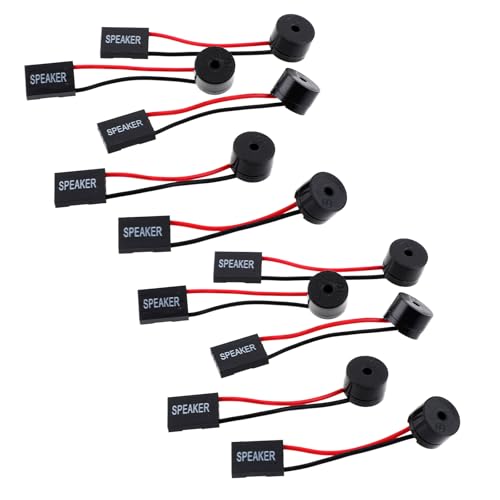
The SynHHergyx 10-piece set provides a cost-effective solution with multiple internal PC speakers, each measuring 2.3 inches in length. Designed as plug & play units, these motherboard speakers come with a 4-pin female connector and easy-to-wire red (positive) and black (negative) cables. Their primary function is to emit BIOS beep codes that signal motherboard status during startup or troubleshooting phases. Bundled in sets of ten, they cater to bulk replacements or multiple system setups.
5 PCS Motherboard Speaker, PC Internal BIOS Mini Buzzer

The WEICHUANG 5-piece motherboard speaker features mini plug buzzers that are perfect for hearing internal beep alerts from your PC motherboard. Each buzzer measures approximately 2.3 inches long and connects via a 4-pin female connector. It is plug and play, designed to simplify installation on the front panel speaker header. The included wiring is flexible for polarity, accepting either red or black wires interchangeably, making it easy to integrate with most PC setups for BIOS alert purposes.
PC Motherboard Internal Speaker by Corpco
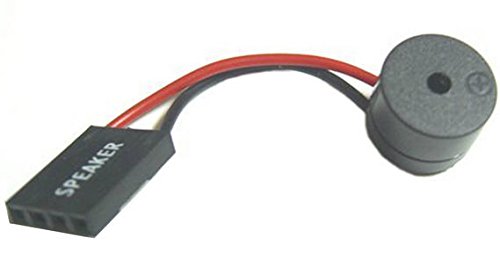
The Corpco PC Motherboard Internal Speaker offers a straightforward design specifically for detecting and hearing the motherboard’s post code beeps. It plugs directly onto the speaker header with an approximately 3-inch cable that reduces wiring clutter. Its durable build and easy installation help ensure clean cable management inside your PC case while reliably functioning as a BIOS alert buzzer for system diagnostics.
Buying Guide: Choosing The Best Internal Speaker For Your PC
Selecting the right internal speaker for your PC motherboard depends on several considerations to ensure compatibility and effective audio signaling.
Connector Type and Compatibility
Verify the connector interface on your motherboard, typically a 4-pin female connector or a 9-pin USB-style connector, to ensure the speaker plugs in without adapters. Check your motherboard manual for the exact header location and specifications.
Speaker Size and Cable Length
Look for speakers with compact sizes, usually around 2.3 to 3 inches, so they fit easily inside your PC case without obstructing other components. Cable length between the connector and speaker should be sufficient (around 3 inches) for flexible placement but not too long to cause cable clutter.
Sound Clarity and Volume
Although most motherboard beepers emit simple tones, some models include piezo or stereo speaker technology providing clearer and louder alerts. If you want enhanced audio quality or additional system sounds beyond beep codes, consider internal speakers with amplifiers or carbon fiber diaphragms.
Quantity and Use Case
Buy single units if replacing one faulty speaker, or multi-packs if you manage several PCs or want spares. Bulk sets are beneficial for IT professionals or enthusiasts with multiple systems to maintain.
Mounting Options and Installation
Some internal speakers offer additional mounting methods such as adhesive backing or included screws to secure them inside the case, reducing vibrations and ensuring stable sound delivery.
Durability and Material Quality
Choose speakers made with quality plastic and corrosion-resistant components to ensure long-lasting performance inside the PC’s potentially warm and confined environment.
Assess your motherboard’s requirements carefully, and prioritize compatibility and clear system alert audibility when choosing an internal PC speaker to enhance your PC maintenance and troubleshooting efficiency.