Choosing an external DVD drive that plays well with Android tablets can be a challenge. The following selections prioritize compatibility with Android devices, simple plug-and-play setup, and reliable read/write performance. Each option below links to Amazon for easy purchasing and includes a brief look at key features to help you compare quickly.
| Product | Brand | Key Benefit | Compatibility |
|---|---|---|---|
| archgon External CD/DVD Drive | archgon | Android connectivity for reading and transferring from discs | Android devices, Windows, Mac |
| Laurensory External DVD Drive | Laurensory | High-speed USB 3.0/2.0 with broad OS support | Windows, Linux, Mac, USB-equipped devices |
| Kadlun External CD/DVD Drive | Kadlun | SD/TF card slots plus USB hubs for multitasking | Windows, Mac, Linux |
| BPAKDU External CD/DVD Drive (8-in-1) | BPAKDU | Multiple ports including USB hub and card slots | Windows, Mac, Linux |
| PROSCAN Elite 10.1″ Tablet/DVD Combo | PROSCAN | Built-in DVD player on a portable Android tablet | Android 11 GO, 10.1″ display |
Archgon External CD/DVD Drive With Android Support

The Archgon model is designed to connect Android devices directly, enabling users to transfer photos, videos, music, and data from an Android phone or tablet to a disc. It also supports playing and reading CD/DVD content on Android OS devices. This unit emphasizes data preservation and ease of use, helping students and families back up media from mobile devices to discs. It’s compatible with Windows 10 and Mac, expanding cross-platform utility. The drive also highlights home-learning benefits, allowing educational material from DVDs to be consumed on a tablet. For Android-centric workflows, this option reduces the need for separate PCs or laptops.
Key features include Android connectivity for data transfer, backup and playback from discs, and a focus on learning-from-home scenarios. The device can serve as a compact, portable solution for households that rely on tablets for education and media consumption. As with many external drives, performance depends on USB port capability and the host device’s support for optical media. Prospective buyers should confirm Android compatibility with their specific tablet model and the Android version in use. Overall, Archgon offers a solid option where Android playback and data transfer are prioritized.
Laurensory USB 3.0 External CD/DVD Drive
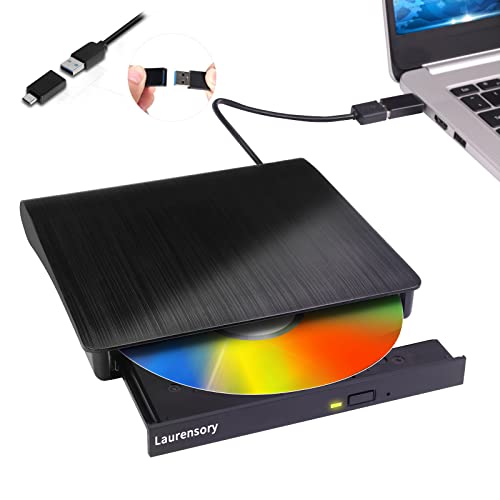
The Laurensory external drive emphasizes high-speed USB 3.0 connectivity and broad OS compatibility. It functions as a portable CD/DVD burner, writer, reader, and ripper, making it suitable for backing up disks or ripping media to a computer. While the product description notes compatibility with Windows, Linux, and various Mac OS versions, the device’s plug-and-play design minimizes setup complexity for Android tablets when paired with compatible OTG adapters or host devices that support USB optical drives. This model shines for users who need both reading and burning capabilities in a single compact unit and who frequently transfer discs to notebooks or tablets.
With maximum write speeds noted for DVDR and CD formats and a strong USB3.0/2.0 compatibility range, the Laurensory drive targets users seeking fast data transfer without introducing extra software on the host device. However, Android tablet support is not always guaranteed out of the box; potential buyers should verify Android OTG support and any required drivers for their device. Overall, Laurensory provides a versatile, fast option for mixed media tasks on the go.
Kadlun External CD/DVD Drive With Card Slots

Kadlun offers a multifunction external CD/DVD drive with an independent SD/TF card slot and extra USB ports. This model also includes a USB-C slot and USB 3.0/2.0 options, enabling data transfer from SD/TF cards directly to the computer and supporting peripheral connections. The device is positioned as compatible with Windows, Linux, and all major Mac OS versions, expanding cross-platform utility. The addition of SD/TF card support can be particularly appealing to users who routinely transfer media from cameras to a computer or tablet. Note that SD and TF cards cannot be used simultaneously, and some USB 2.0 features depend on port compatibility.
For Android tablet users, effectiveness depends on OTG capability and whether the tablet recognizes the drive as an external storage device. The Kadlun drive is robust for traditional computer workflows and can complement a tablet if the user has appropriate adapters. It’s a solid choice for users who value card-slot versatility alongside disc reading and burning tasks.
BPAKDU 8-in-1 External CD/DVD Drive

BPAKDU’s 8-in-1 external drive bundles a CD/DVD reader and burner with a built-in USB hub, plus additional USB and card slots. This design aims to provide a compact, multi-port solution that can handle media transfer, software installation, and file storage enhancements from a single device. It’s described as widely compatible with Windows, Mac, and Linux systems, and includes guidance for troubleshooting recognition issues on Windows machines through a powered setup or a driver tool. Android tablet compatibility is not guaranteed out of the box, so potential buyers should verify whether their specific Android device supports OTG and recognizes external optical drives. The value proposition lies in its all-in-one approach for mixed media tasks.
When evaluating for an Android tablet, consider whether you need the extra ports and whether OTG support is present on your tablet. The BPAKDU 8-in-1 is best for users who want a portable drive with several built-in expansion options in a single package, especially if they frequently juggle USB devices, memory cards, and a small form factor location for media playback.
ASUS ZenDrive V1M External DVD Drive

The ASUS ZenDrive V1M emphasizes cable management with built-in cable storage, reducing clutter on mobile setups. It uses USB-C for modern devices and supports M-DISC for long-term data storage. While this drive is versatile for Windows and macOS, its Android compatibility will depend on the tablet’s USB host capabilities and the availability of appropriate playback software. The built-in cable storage makes it a practical choice for travel or on-the-go use, especially for users who switch between devices and want a tidy, ready-to-use solution. It’s a strong option for those prioritizing reliability and long-term data preservation on mixed-device environments.
PROSCAN Elite 10.1″ Quad Core Tablet with DVD

PROSCAN merges a 10.1-inch Android tablet with an integrated DVD player, offering a complete media solution in a portable form factor. The device runs Android and includes a quad-core processor, 2GB RAM, and 32GB internal storage, with a 1280×800 IPS display. This model provides an all-in-one alternative to pairing a tablet with an external DVD drive, enabling DVD playback directly from the device’s own hardware. It is well-suited for families and students who want a dedicated Android tablet that can also handle disc playback without requiring additional peripherals. For users focused on Android-native media consumption, this option offers convenience and simplicity in one package.
As with any device combining tablet and optical drive, consider battery life, available software options for DVDR/DVD playback on Android, and potential updates to the Android OS that could affect compatibility. The PROSCAN option stands out for those who prefer an integrated, ready-to-use Android tablet with built-in disc playback rather than adding external drives to an existing tablet setup.
Buying Guide: Key Purchase Considerations
- Android compatibility: Look for devices explicitly mentioning Android connectivity or OTG support. Some drives require USB adapters or OTG cables to work with tablets.
- Data transfer vs. playback emphasis: If you mainly transfer data from discs to Android, prioritize drives with strong read capabilities and backup features. If you primarily play discs on Android, ensure the device or tablet can run the necessary playback software.
- Power and USB standards: USB 3.0/3.1 support delivers faster transfers. Some drives require external power; check if your tablet can supply sufficient power via USB-C or if an adapter is needed.
- Multifunction features: Card readers (SD/TF), USB hubs, and additional ports can add value for photographers, students, and travelers who juggle multiple media sources.
- Cross-platform compatibility: If you also use Windows, macOS, or Linux devices, a drive with broad compatibility minimizes compatibility issues and drivers.
- Portability and durability: Compact drives that tolerate travel and frequent plugging/unplugging are ideal for mobile setups and classrooms.
- Software requirements: Some drives rely on bundled software for burning, ripping, or playback. Verify that software support aligns with your Android tablet’s capabilities and storage plan.
- Warranty and support: A reliable warranty and accessible customer support are helpful when dealing with drive compatibility or data transfer issues.