The following guide highlights five dependable DVD players that support high-quality video and versatile audio connections, including optical output where available. Each model emphasizes broad disc compatibility, straightforward setup, and solid upscaling or HDMI performance to enhance a standard TV or home theater system. Use the product snippets below to compare features, formats, and connection options that best fit your home viewing setup.
| Product | Brand | Main Output | Key Strength |
|---|---|---|---|
| MEGATEK Region-Free HDMI DVD Player | MEGATEK | HDMI, RCA | Multi-Region, Upscaling |
| DESOBRY Mini DVD Player | Desobry | HDMI, AV | Compact, All-Region |
| Sony DVPSR510H DVD Player | Sony | HDMI | Upscaling, Slim Design |
| Sony DVPSR210P DVD Player | Sony | AV (No HDMI) | Multi-format Playback, TV Control |
| Panasonic Blu Ray/DVD Player DMP-BD84P-K | Panasonic | HDMI, USB | Blu-ray and DVD, External Storage |
MEGATEK Region-Free HDMI DVD Player

The MEGATEK player offers multi-region DVD playback (regions 1–6) and supports both PAL and NTSC formats, providing broad international compatibility. It upscales standard-definition content to Full HD via 1080p HDMI, delivering clearer image detail when connected to a compatible television or AV receiver. In addition to DVDs, it reads a range of formats including DVD±R/R DL, DVD±RW, SVCD, VCD, plus CD, MP3, WMA, and JPEG. The device includes HDMI and RCA cables and a remote for convenient control. Note that Blu-ray discs are not supported.
DESOBRY Mini DVD Player HDMI, All-Region

This compact DESOBRY model is designed for space-saving setups, measuring about 6.1 by 5.9 by 1.2 inches and weighing roughly 1.1 pounds. It comes with a full-function remote and supports HDMI output for Full HD 1080p upscaling. The device is described as all-region compatible, with the ability to read DVDs and CDs and handle various file formats via USB or TF card. Features include an upgrade drive, memory of last playback position, anti-shock buffering, and quick loading for smooth operation.
Sony DVPSR510H DVD Player

The Sony DVPSR510H offers a slim design with HDMI output and 1080p upscaling, delivering enhanced picture quality for standard DVDs. It supports JPEG and MP3 playback and includes a multi-disc resume feature and a TV remote with multi-band capability. This model is positioned for reliable performance with energy-efficient operation and comes with a 1-year parts warranty and a 90-day labor warranty. It is suitable for households that want a compact player with modern upscaling and simple operation.
Sony DVPSR210P DVD Player

The DVPSR210P focuses on broad format compatibility with DVD and CD playback and uses a basic AV connection (no HDMI). It can control TV functions via a multi-brand remote, allowing straightforward integration with various TV setups. This player is geared toward users seeking dependable disc playback without needing HDMI, while still supporting essential functions and remote control convenience.
Sony BDP-S1700U Blu-ray DVD Player

This Sony Blu-ray and DVD player supports Blu-ray discs in full HD, with DVD upscaling as part of its feature set. It includes an HDMI connection for high-quality video output and comes with an HDMI cable. The model is positioned for users who want Blu-ray compatibility alongside standard DVDs, delivering an enhanced viewing experience with straightforward setup and ongoing support for a broad range of media.
Electcom Pro DVD Player With HDMI And Regional Playback
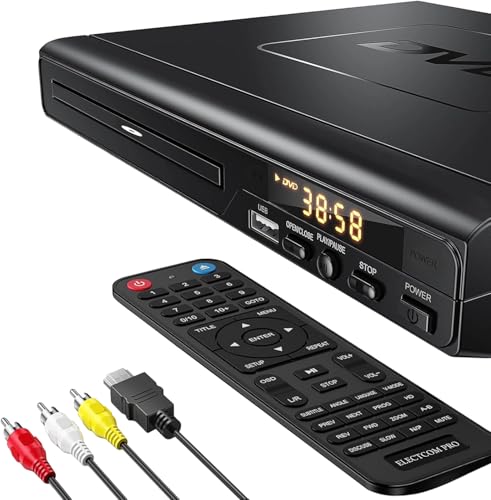
The Electcom Pro unit emphasizes HDMI output with region-free playback, designed to be accessible for elderly users and family viewing. It supports DVD and CD formats plus USB and SD card input. While marketed for its simple operation and broad file compatibility, prospective buyers should confirm the exact audio output options if optical output is a must-have, as this model mainly highlights HDMI and AV connections.
Buying Guide: What to Consider When Choosing a DVD Player With Optical Output
- Optical audio output availability: If you specifically need an optical (Toslink) output, verify the exact rear panel connections before purchase, as some models emphasize HDMI or AV outputs instead.
- Disc and file format support: Look for players that handle DVDs, CDs, and common formats like MP3, JPEG, and VCD, plus compatibility with regional playback if you travel or have discs from different regions.
- Video upscaling quality: For standard-definition DVDs, consider models that offer 1080p upscaling to improve image clarity on modern HDTVs.
- Regional playback: Region-free or multi-region capabilities are valuable if you own discs from different locales. Check region designations (1–6) and any PAL/NTSC considerations.
- Output options and compatibility: HDMI delivers the easiest setup for most TVs, while AV (RCA) connections remain relevant for older TVs. An optical output can be critical for some home audio systems; confirm this spec if needed.
- Remote and ease of use: A user-friendly remote and clear on-screen menus improve the daily experience, especially for older users or shared households.
- Physical size and power efficiency: If space is tight, compact players help, but ensure they still offer required features and outputs. Energy efficiency ratings can also be a consideration for long-term use.
- Warranty and support: A reliable warranty helps protect your investment, particularly for players used frequently and connected to home audio systems.
When selecting a DVD player for optical output and broad compatibility, evaluate how your TV, sound system, and regional media align with the device’s outputs and playback features. The products above provide a spectrum of choices—from compact, region-free options to Blu-ray capable players with HDMI performance—to help you find a model that fits your setup without compromising audio quality.