Choosing the right conference call speaker for your laptop is essential for clear communication, whether you’re working remotely or in a conference room. This article reviews the best conference call speakers that deliver 360° voice pickup, AI noise reduction, and compatibility with leading software platforms. Below is a summary table featuring top models selected for sound clarity, microphone quality, and convenient connectivity options.
| Product | Brand | Key Features |
|---|---|---|
| EMEET Conference Speakerphone M0 Plus | EMEET | 4 AI mics, 360° voice pickup, noise reduction, daisy chain for 16 people |
| Jabra Speak 510 MS Wireless Bluetooth Speakerphone | Jabra | Crystal-clear audio, portable, USB/Bluetooth connectivity |
| Anker PowerConf Speakerphone | Anker | 6 mics 360° voice pickup, real-time voice enhancement, 24H call time |
| Yealink SP92 Conference Speaker and Mic | Yealink | AI noise cancelling, 360° coverage, full-duplex conversation support |
| Dell SP3022 USB Computer Speaker | Dell | Compact soundbar, AI noise echo cancellation, MS Teams certified |
EMEET Conference Speakerphone M0 Plus for 360° Voice Pickup

The EMEET M0 Plus features a four-microphone array providing enhanced 360-degree voice pickup with AI algorithms that eliminate background noise and echo. Its 3W high-quality speaker ensures crystal-clear audio suitable for up to 8 attendees, with the option to daisy chain two units to cover up to 16 participants. This flexibility suits both small rooms and larger meeting spaces.
It supports multiple conferencing software platforms, offers full duplex audio for natural conversation flow, and has USB-C and Bluetooth connectivity. The device’s noise reduction technology and advanced voice clarity make it ideal for dynamic remote meetings.
Jabra Speak 510 Wireless Bluetooth Conference Speaker
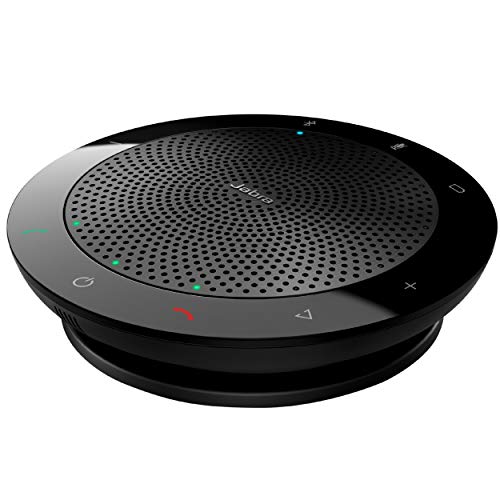
The Jabra Speak 510 offers outstanding sound quality with crystal-clear audio for professional meetings. It is highly portable and known for its quick setup, supporting both Bluetooth and USB connectivity. This flexibility allows seamless integration with laptops and smartphones.
Designed for hassle-free use, the Jabra Speak 510 provides sharp sound clarity. This speakerphone is certified for Microsoft Teams and optimized to maintain reliable performance across various conferencing environments.
Anker PowerConf Speakerphone with 6 Microphones

The Anker PowerConf stands out with 6 microphones arranged for 360-degree voice pickup, ideal for personal workspaces or medium rooms. Its custom DSP algorithm enhances voice clarity in real time while significantly reducing background noise.
This device automatically balances speaker volume to adjust for distance, improving audio quality for remote collaboration. Its Bluetooth 5.3 and USB-C connectivity offer stable, versatile connections compatible with leading conferencing platforms.
Yealink SP92 AI Noise Cancelling Conference Speaker

The Yealink SP92 excels in AI-powered noise cancellation, filtering over 1,000 common background sounds including keyboard clicks and air conditioning hum. Its omnidirectional microphone and 50mm speaker deliver clear audio for 4-8 person meetings within a 13-foot radius.
It supports full duplex communication for natural multi-person conversation, integrates echo cancellation technology, features virtual bass for balanced audio, and is certified for Microsoft Teams, making it well-suited for small conference rooms or home office setups.
Dell SP3022 USB Computer Speaker with AI Noise Cancellation
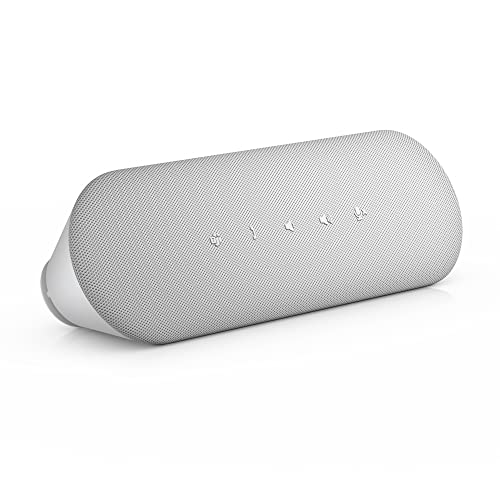
The Dell SP3022 is a compact USB soundbar designed for business conferences. It includes AI noise echo cancellation, enabling multiple people to speak simultaneously without audio clipping. LED indicators provide easy call control for muting and volume adjustments.
This device integrates seamlessly with Microsoft Teams, delivering clear full-duplex audio. Its minimalist design fits neatly on a desk or monitor base, combining both aesthetics and functionality for professional workspaces.
Buying Guide: Choosing the Best Conference Call Speaker for Your Laptop
When selecting a conference call speaker for your laptop, consider several important factors to ensure optimal audio quality and usability:
1. Microphone Array and Voice Pickup
Look for speakerphones with multiple microphones arranged for 360° voice pickup. This ensures your voice is captured clearly from any direction, especially crucial in group meetings. Devices with 4 or more mics featuring AI voice algorithms offer superior sound clarity.
2. Noise Reduction and Echo Cancellation
A speakerphone equipped with AI noise reduction and echo cancellation technology effectively eliminates background noises like keyboard typing, air conditioning, and ambient chatter. This leads to clearer conversations and minimizes distractions.
3. Connectivity Options
Check that the speaker supports your preferred connection method, such as USB-C for wired reliability or Bluetooth for wireless convenience. Some speakers offer both, providing flexibility for different environments and devices.
4. Audio Quality and Full Duplex Support
Clear sound is essential. Devices with full duplex audio allow simultaneous speaking and listening, making conversations more natural. Consider speakers with high-quality drivers and enhanced sound algorithms for balanced voice and music playback.
5. Portability and Battery Life
For on-the-go professionals, portable speakerphones with long battery life (e.g., 24 hours or more) are advantageous. Compact designs that fit easily in bags or laptop cases add to usability outside the office.
6. Compatibility and Certifications
Ensure the speakerphone is compatible with your favorite software such as Zoom, Microsoft Teams, or Google Meet. Devices certified by these platforms often provide improved integration, call controls, and performance reliability.
7. Expansion Features
Some models offer daisy chaining capabilities to link multiple speakers, extending microphone and speaker coverage for larger rooms or more attendees. This scalability can accommodate growing team meeting needs.
Assess your meeting room size, number of participants, and noise environment to select a conference speaker that delivers immersive, clear audio and enhances your interactive remote communication using your laptop.