The following selection highlights strong Blu-ray drive options and external players suited for PC setups. Each product supports Blu-ray playback or burning, with varying speeds, compatibility, and connection types. This guide helps you compare performance, interface, and cross‑platform support to choose the best Blu-ray solution for your computer needs.
| Product | Brand | Type | Key Feature |
|---|---|---|---|
| ASUS BW-16D1X-U | ASUS | Internal/External Blu-ray Drive | 16x writing speed with BDXL support |
| APPINESSEY 5‑in‑1 Drive | APPINESSEY | External Blu-ray Drive | Dual USB‑A ports plus SD/TF slots |
| Sony BDP‑S1700U | Sony | Blu-ray/DVD Player | Full HD upscaling, HDMI included |
| Panasonic DMP‑BD84P‑K | Panasonic | Blu-ray/DVD Player | Full HD upscaling, high‑res audio |
| BUNUD External Blu-ray Drive | BUNUD | External Blu-ray/CD/DVD Drive | 5‑in‑1 with USB 3.0 and Type‑C |
ASUS Powerful Blu-ray Drive With 16x Writing Speed
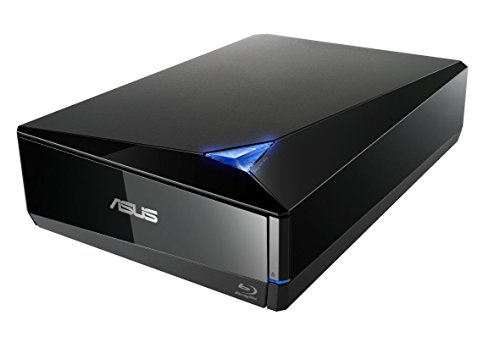
ASUS offers a high‑speed Blu-ray writing solution with 16x BD write capability and BDXL support, allowing data storage up to 128 GB. This drive supports cross‑compatibility with Windows 10, 8, 7, Vista, XP, and Mac OS X 10.6 or higher via USB 3.0/USB 3.1 Gen1. Its temperature operating range spans 5°C to 40°C, making it suitable for varied environments. The device is a strong option for users needing fast backups and reliable BD data handling across Windows and macOS ecosystems.
APPINESSEY External Blu-ray Drive 5‑in‑1

This 5‑in‑1 external Blu-ray drive doubles as a Blu-ray player for PC and includes two extra USB‑A 3.0 ports, plus SD/TF card readers and CD/DVD burning. It supports Blu-ray read speeds up to 6x and enhances 3D playback. The USB 3.0 interface delivers up to 5 Gbps data transfers, significantly speeding file access. Note that external power may be required if the USB port cannot supply sufficient voltage for sustained operation.
Sony BDP‑S1700U Blu-ray DVD Player

Sony’s BDP‑S1700U delivers Full HD Blu-ray playback with upscaling for DVDs, paired with an included HDMI cable for simple setup. It provides straightforward operation and reliable disc playback, suitable for users who want a dedicated player to enjoy Blu-ray movies on a home theater system alongside a PC setup.
Panasonic Blu‑Ray DVD Player DMP‑BD84P‑K

Panasonic’s DMP‑BD84P‑K emphasizes compact design with full HD upscaling and high‑resolution audio playback. It supports BD/DVD/CD formats and upscales video to 1080p, delivering clearer picture quality on compatible displays. The device is designed to fit into tight media setups while offering solid performance for movie enthusiasts.
BUNUD External Blu Ray CD DVD Drive

The BUNUD external drive presents a 5‑in‑1 solution with USB 3.0 Type‑C options and a second USB port for additional peripheral bandwidth. It supports Windows, Mac, and Linux environments, and includes HDMI output for direct media streaming. The device is designed for easy plug‑and‑play use without driver installation, though 4K Blu‑ray playback may require compatible software and hardware support.
Yaeonku 8 in 1 External Blu-ray/DVD Drive

This 8‑in‑1 external drive supports 100G burning technology with up to 6x BD read speeds, 8x DVD read speeds, and 24x CD read speeds. It includes HDMI and LAN functionality for network sharing and media streaming. The Type‑C and USB 3.0 interfaces offer flexible connectivity, with the HDMI output enabling direct media playback on compatible displays. Note software compatibility is required to enable Blu-ray playback on some systems.
Buying Guide
- Compatibility: Verify operating system support (Windows versions, macOS) and interface (USB 3.0, USB-C). Consider whether internal or external drives best fit your PC or laptop setup.
- Playback vs. Burning: Distinguish between drives optimized for Blu-ray playback, recording, or both. If burning is essential, prioritize drives with high BD write speeds and BDXL support where needed.
- Video and Audio Quality: Look for models that support upscaling to 1080p or better, and high‑resolution audio formats like Dolby Digital or DTS where applicable.
- Connectivity: Consider whether HDMI output is needed for direct connection to a TV or monitor, and whether LAN or additional USB ports are required for peripherals.
- Power and Reliability: External drives may require an external power adapter; ensure sufficient power delivery for stable operation, especially on laptops without ample USB power.
- Software Considerations: Some drives may require third‑party software for Blu‑ray playback or 3D content. Check compatibility with CyberLink or similar media suites.
- Physical Footprint: If space is limited, select compact players like the Panasonic model or slim external drives designed for small setups.