For viewers who travel, share media from different regions, or want to revitalize an aging DVD collection, an all-region Blu-ray player can be a smart investment. The following picks support Blu-ray and DVD playback across multiple regions, offer upscaling to improve standard-definition content, and connect easily to modern HDTVs and sound systems. This guide highlights five top options, with objective notes on capabilities and compatibility to help you compare features side-by-side.
| Product | Brand | Region Support | Key Benefit |
|---|---|---|---|
| Region Free Blu-Ray Player with Dynastar Bundle | Dynastar | A/B/C; DVDs Regions 0-8 | Full region flexibility with 1080p upscaling |
| Region Free Blu-ray Player with Dynastar Bundle (S1700) | Dynastar | A/B/C; DVDs Regions 0-8 | Bright Full HD playback and upscaling |
| Sony Multi Zone Region Free Blu Ray Player | Sony | Wide format compatibility with streaming options | |
| JOVELL HD Blu Ray Player | JOVELL | Multiple connections and USB media support | |
| MEGATEK Region-Free HD DVD Player | MEGATEK | Upscaling and broad format support |
Note: All products listed support Blu-ray and DVD playback across multiple regions. Availability and compatibility with specific TV setups may vary by region and HDMI/AV connections. Always verify that the unit’s region codes align with the media you own before purchase.
Region Free Blu-Ray Player With Dynastar Bundle

This Dynastar-region-free player supports Blu-ray regions A, B, and C, and standard DVDs from all regions (0-8). It upscales DVDs to 1080p via HDMI for enhanced picture quality and delivers immersive audio alongside Full HD Blu-ray playback. The bundled 6-foot HDMI cable helps simplify setup with compatible HDTVs, ensuring a theater-like home viewing experience.
Dynastar Multi-Region Blu-ray With S1700 Design
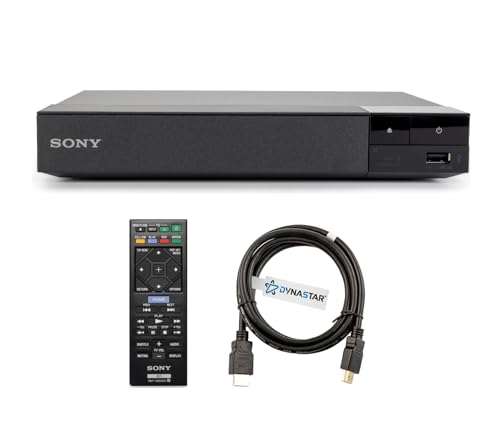
This Dynastar model provides region-free playback for Blu-ray discs (A, B, C) and DVDs from any region. It emphasizes Full HD 1080p video with high-definition sound and DVD upscaling through HDMI. Aimed at users who want a reliable, all-region setup, it integrates easily with modern AV systems and supports typical home theater components via standard HDMI.
Sony Multi Zone Region Free Blu Ray Player

Sony’s multi-zone player supports NTSC to PAL DVD and Blu-ray conversion, enabling compatibility across zones A, B, and C. It offers broad streaming service access through a connected internet setup and ensures playback across a wide range of TVs via HDMI. The model is designed for homes with diverse media libraries and mixed format catalogs.
JOVELL Blu-ray Player With All-Region Support

JOVELL’s player is designed for region A Blu-ray discs and all-region DVDs, offering multiple connection options (HDMI, AV, Coaxial) and USB media playback. It also supports playback from USB drives to access digital files, making it a flexible option for mixed media environments and diverse entertainment needs.
Dynastar Region-Free Sony BDP-S6700 Style Player

This Dynastar model emphasizes a region-free experience for Blu-ray discs across A, B, and C, along with broad DVD compatibility. It supports 3D, Wi-Fi connectivity, and 4K upscaling potential for compatible displays, providing a modern upgrade path for home theaters that want high-quality visuals plus regional flexibility.
Sony UBP-X700U 4K Ultra HD Player

Sony’s UBP-X700U brings 4K Ultra HD upscaling, HDR10 support, and high-resolution audio to a wide range of media formats. While not explicitly a multi-region device in every region, it pairs with region-free discs and standard DVDs for a comprehensive home theater experience. It’s suitable for users who want strong image quality and broad format support in a single player.
Buying Guide: Key Considerations For All-Region Blu-ray Players
- Region compatibility: Confirm Blu-ray region support (A, B, C) and DVD region coverage (0-8). Some models emphasize all-region DVD with restricted Blu-ray regions, so match to your media library.
- Video quality and upscaling: Look for 1080p upscaling on DVD content and 4K upscaling where available. HDMI output quality impacts compatibility with newer TVs and sound systems.
- Connectivity: Check HDMI, optical/coaxial audio, USB input, and network options (Wi-Fi or Ethernet) for streaming and firmware updates.
- Disc formats supported: Some players handle CD, MP3, JPEG, and media USB playback in addition to Blu-ray/DVD. Ensure the formats you use are supported.
- Video standards: Ensure compatibility with PAL/NTSC formats if you have devices from different regions or countries.
- Bundle accessories: HDMI cables and remote controls can influence setup practicality. Bundles may include longer HDMI cables and basic accessories for a quicker setup.
- Future-proofing: Consider models with 4K upscaling, HDR support, and Wi-Fi streaming to extend the device’s usability as TV tech evolves.
- Physical design and reliability: Metal housing often indicates sturdier construction; read user reviews for long-term reliability and fan noise concerns.
- Power compatibility: Some units support 110-240V input, which is important for use in different regions without additional adapters.