Preserve classic 8 mm, Hi8, and Digital8 tapes by choosing reliable playback and digitization options. This guide highlights five top picks that cover direct playback, tape-to-digital transfers, and reliable transfer hardware. Each option emphasizes ease of use, compatibility, and preserving memories for modern devices. Read on to compare features and find the solution that best fits your collection.
| Product | Brand | What It Does | Key Benefit |
|---|---|---|---|
| Hi8 8mm VCR Video Cassette Recorder, Play and Digitize Your Old 8mm and Hi8 Tapes | Tech Collector | Plays old tapes; includes USB adapter to digitize with any PC | All-in-one playback and digitization |
| Sony Standard Grade 8mm Camcorder Videotape Cassette, 120 Minutes | Sony | Standard 8mm tape with 120-minute capacity | Reliable, long playback time |
| Sony Camcorder for 8mm Digital8 Hi8 Tape Transfer to Computer USB and DVD | Sony | Playback of 8mm, Video8, Hi8, Digital8; USB capture to computer or DVD | Direct digital transfer to devices |
| Sony Hi-8 HMPD 120 minute 2-Pack Video Camcorder Cassette Tapes | Sony | Two tapes per pack; higher picture quality with Depression Surfacing | Quality and value |
| Video Tape Transfer Service (VHS, Hi8, Video 8, 8mm, VHS-C, MiniDV) to Digital MP4 | Time To Remember | Professional transfer to MP4 with cloud delivery | Hands-off digitization |
Hi8 8mm VCR Video Cassette Recorder, Play and Digitize

The Tech Collector Hi8 8mm VCR combines traditional playback with a straightforward path to digitization. This unit is designed to play back 8mm and Hi8 tapes and includes a USB adapter for transferring footage to a PC. It serves as a practical solution for households with a backlog of tapes and a desire for simple digital copies. The integrated playback features and compatibility with USB digitization make it a convenient entry point for non-technical users seeking to preserve memories without a complex setup.
Key considerations: Ensure your computer has compatible software for recognizing the USB transfer, and check that your tapes are in decent physical condition to minimize playback issues. This option is best for those who want an all-in-one device that minimizes the number of separate components.
Sony Standard Grade 8mm Camcorder Videotape Cassette, 120 Minutes

Sony’s 8mm standard-grade tapes offer a reliable 120-minute recording window. These tapes are designed for compatibility with many 8mm film camcorders and decks, providing consistent performance over multiple uses. They’re a practical choice for households with a mix of shorter and longer recording sessions, ensuring you can complete projects without frequent tape changes.
Key considerations: Tape quality impacts playback reliability and color integrity. For archival projects, consider testing a few tapes before committing to a large transfer workflow to confirm compatibility with your specific camcorder or player.
Sony Camcorder for 8mm Digital8 Hi8 Tape Transfer to Computer USB and DVD
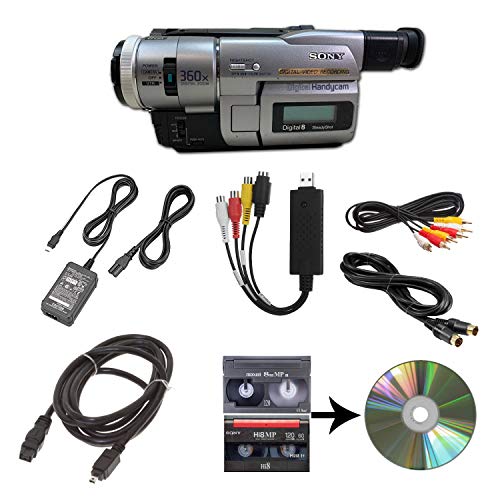
This Sony camcorder kit is designed for comprehensive transfer to modern formats. It can play a broad range of tapes (8mm, Video8, Hi8, Digital8) and includes a USB capture setup to move footage to computer files or burn to DVD. It comes with essential cables and a power supply, enabling smooth transfers with a ready-to-use workflow that minimizes the steps required to preserve old footage.
Key considerations: Verify that your computer supports the included transfer workflow and that the supplied cables connect correctly to your display or storage setup. This option is ideal for users seeking a turnkey transfer solution with hardware bundled for immediate use.
Sony Hi-8 HMPD 120 Minute 2-Pack Video Camcorder Tapes

Two tapes per pack provide a practical balance of cost and capacity, with reported picture quality improvements relative to standard metal-particle tapes. The Depression Surfacing technology helps ensure smoother tape travel and playback. This makes the pack a sensible choice for ongoing projects where multiple takes or long sessions are needed, reducing the frequency of swap-outs during transfers or playback.
Key considerations: While producing higher-quality playback, ensure the tapes are stored properly to avoid binder issues or warping. Testing a tape before committing to critical transfers is recommended.
Video Tape Transfer Service to Digital MP4

This service offers a professional transfer workflow for VHS, Hi8, 8mm, and related formats to MP4 with cloud delivery. The offering includes one tape transfer, 30 days of cloud access, and complimentary media recycling. The standard resolution is 640×480, aligning with older formats while providing easy streaming and playback on modern devices.
Key considerations: Outsourcing transfers reduces the risk of hardware issues but introduces turnaround times and data handling considerations. It’s a strong option for those who prefer a hands-off, professional digitization path or who lack compatible hardware for home transfers.
Portta VHS to Digital Converter, Video to Digital Recorder

The Portta adapter functions as a standalone converter and recorder with a built-in LCD and speaker. It supports AV, S-Video, and AUX inputs, and can store captured video as MP4 or audio as MP3 on USB drives or TF cards. It is designed for direct recording and playback without a PC, making it a flexible solution for those who want to digitize on the go or without a computer.
Key considerations: This is a converter-only device and cannot play tapes independently. Ensure you have a source player and appropriate cables. It is well-suited for quick digitization projects and for preserving formats that lack native computer capture capabilities.
Buying Guide: Key Purchase Considerations For 8 Mm Tape Digitization
- Format compatibility: Confirm your tapes (8mm, Hi8, Digital8, VHS-C) align with the device or service you choose. Some options handle multiple formats, while others specialize in a subset.
- Digitization workflow: Decide between a turnkey transfer (hardware with built-in capture) and a professional service (hands-off but with longer turnaround).
- Storage and file formats: Look for MP4 or MP4/MP3 outputs for broad device compatibility. Check whether storage is on USB drives, SD cards, or cloud delivery.
- Hardware footprint: Consider the size, cabling, and power needs. If space is limited, a compact converter or a single-device solution may be preferable.
- Preservation quality: Tapes vary in condition. High-quality tapes and tapes with advanced formulations often yield better color and stability during playback and transfer.
- Future-proofing: Favor devices and services that provide widely supported file formats and easy access to your digital copies across devices.
- Cost vs. effort: Home hardware options save time and money for frequent transfers; professional services reduce risk for fragile tapes but come with processing delays.
- Return policy and support: Choose vendors with clear warranties and accessible support, especially for older formats that may require troubleshooting.