Compact 16 inch sound bars deliver improved dialogue clarity and deeper bass without taking much space. Below is a quick comparison table of five compact models selected for typical TV, gaming, and small-room use.
| Model | Key Features | Best For |
|---|---|---|
| Bluedee 16-inch Sound Bar | 50W Bass Boost, Bluetooth, Optical, Aux | Movies With Punchy Bass |
| Wohome S100 16-inch | 2.1ch, Built-in Subwoofer, 6-Level Voice Enhancement | Dialogue Clarity / Seniors |
| BESTISAN / MEGACRA 16-inch | HDMI ARC, DSP, 3 EQ Modes, Bass Tube | Versatile TV & PC Use |
| ULTIMEA Solo B30 Pro 16-inch | App Control, Built-in Subwoofer, Adjustable Bass | Gamers & App-Based Control |
| LITTOAK 16-inch Sound Bar | 50W, HDMI ARC, Multiple EQ Modes | All-Round Home Audio |
Bluedee 16-Inch Sound Bar With Bass Boost

The Bluedee 16-inch sound bar emphasizes low-frequency impact with two large bass radiator units and a claimed 50 Watts bass boost. Connectivity includes Bluetooth, Optical, 3.5mm Aux, and an Aux-to-RCA cable, which covers most modern and legacy devices. Built-in DSP offers three EQ modes (movie, music, news) to tailor sound for different content. The single-piece design is wall-mountable and suitable for small living rooms or bedrooms where extra bass is desired without adding a separate subwoofer.
Wohome S100 16-Inch 2.1ch Soundbar With Voice Enhancement

Wohome’s S100 is a compact 2.1 channel soundbar that integrates a built-in subwoofer to boost bass while keeping a small footprint. The standout feature is 6 levels of voice enhancement, designed to amplify speech frequencies for clearer dialogue, which can be beneficial for seniors or hearing-impaired listeners. Connection options include Optical, AUX, USB, and Bluetooth 5.3. At roughly 2.9″ tall, the unit fits in front of most TVs or can be wall-mounted in tight spaces.
BESTISAN 16-Inch Sound Bar With HDMI And DSP
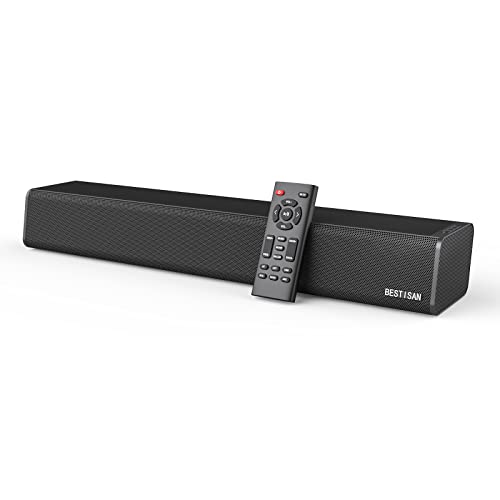
This 16-inch sound bar (sold under BESTISAN / MEGACRA listing) focuses on a tuned soundstage via two full-range speakers and a bass tube. It supports multiple inputs including Bluetooth 5.0, HDMI ARC, Optical, AUX, and USB, enabling connection to TVs, PCs, and projectors. The unit offers three EQ modes and adjustable bass/treble for content-specific tuning. Small LED indicators provide visual feedback for mode and input selection.
ULTIMEA Solo B30 Pro 16-Inch Sound Bar With App Control

ULTIMEA’s Solo B30 Pro is an all-in-one 2.1ch sound bar with built-in dual speakers and a subwoofer. It emphasizes adjustable bass through a proprietary BassMX enhancement and supports app control via the Ultimea Home app for EQ and OTA updates. Connectivity includes Bluetooth 5.3, Optical, AUX, and wall-mount options. The manufacturer recommends it for rooms around 110–160 ft², making it suited to medium-sized living rooms and gaming setups.
LITTOAK 16-Inch 50W Sound Bar With Multiple Inputs
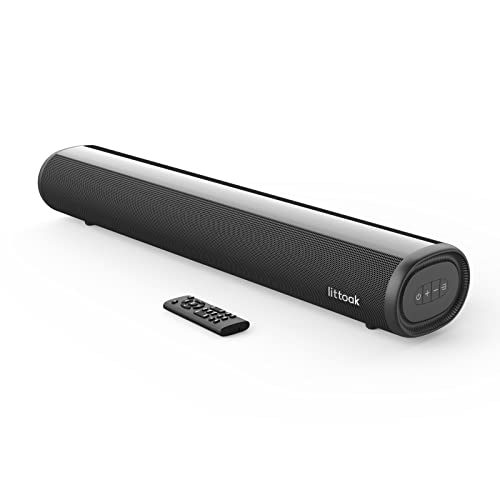
LITTOAK’s 16-inch sound bar offers a balanced feature set with a 50W output and broad input support including HDMI ARC, Optical, RCA, USB, AUX, and Coax. It uses DSP technology to provide three EQ modes (movie, music, dialogue), and a compact form factor intended for small spaces. The design aims to combine easy connectivity with enhanced dialogue clarity and reasonable bass for TV, gaming, and music playback.
Buying Guide: Choosing The Right 16 Inch Sound Bar
Selecting a 16 inch sound bar requires balancing size, connectivity, and audio needs. Below are the key considerations and comparison perspectives to guide your choice.
Room Size And Bass Expectations
Smaller rooms pair well with compact sound bars that have built-in subwoofers or bass radiators. If you want deeper bass without a separate subwoofer, look for built-in subwoofer or bass radiator features. For larger rooms, a separate subwoofer or higher-power systems will perform better.
Connectivity And Compatibility
Check for the specific inputs you need: HDMI ARC is preferred for simplified TV integration and remote control passthrough. Optical and AUX are common backups. Bluetooth versions (5.0/5.3) affect wireless stability and range. USB ports can play media or accept firmware updates on some models.
Dialogue Clarity And EQ Modes
If you watch a lot of dialogue-heavy content, features like voice enhancement or a dedicated dialogue mode improve intelligibility. Multiple EQ modes (movie, music, dialogue) and adjustable bass/treble let you tune playback to content types.
Power And Output
Manufacturer power ratings (Watts) provide a rough idea of loudness but don’t tell the whole story. Consider driver quality, enclosure design (bass tube/radiator), and DSP processing when comparing effective performance.
Installation And Placement
Decide whether you need a wall-mountable unit or one that sits under the TV. Slim, low-profile bars are better for TV cabinets and narrow console spaces. Wall-mount kits and included cables simplify installation.
Smart Control And Extras
App control and OTA updates (e.g., Ultimea) can add convenience and future improvements. Remote control compatibility with your TV remote simplifies everyday use, particularly when HDMI ARC or CEC support is present.
Comparative Perspectives
- Small Footprint + Strong Bass: Choose models with bass radiators or built-in subwoofers (Bluedee, Wohome).
- Dialogue Priority: Pick units with voice enhancement or dialogue EQ (Wohome, LITTOAK dialogue mode).
- Connectivity Flexibility: Look for HDMI ARC plus optical and Bluetooth for wide compatibility (BESTISAN, LITTOAK).
- Advanced Control: If you prefer app-based tuning and updates, consider models with smart app support (ULTIMEA).
Use these considerations to match a 16 inch sound bar to your room size, primary use (TV, gaming, music), and connection needs. Comparing features like bass design, EQ modes, and input types across models will help identify the best compact sound solution for your setup.